

There is no dependable single price for a custom business app in Austin without a defined scope. The mobile app development cost in Austin depends mainly on the number of platforms, user workflows, integrations, and data requirements. A one-location ordering tool and a two-sided marketplace involve very different product work.
A headline range alone does not say what is included. A useful quote names the features, integrations, testing, launch tasks, and post-launch support it covers.
Start with the business task the app should improve, then define the smallest release that can test whether it works.
How Austin businesses can estimate an app budget
Cost labels such as basic are not consistent across providers. One may mean a few screens on one platform; another may include discovery, custom design, backend development, and testing. Compare the listed work, not the label.
Written requirements make bids comparable, but only if each quote says what delivery includes.
Before development, discovery needs to close open decisions. Deliverables can include confirmed user journeys, required screens, named integrations, system owners, assumptions, and acceptance criteria. If access to a payment provider or inventory API is not confirmed, the estimate should say whether investigating that connection is included or will be priced later. Otherwise material work may remain outside the initial scope.
A useful quote breaks out discovery, interface design, backend development, quality assurance (QA), app-store preparation, and warranty coverage. A lower headline total may exclude one or more of these.
What changes the cost for a business in Austin?
The work behind the features drives the estimate. A restaurant group, local retailer, property manager, or service company may all need an app, but their user flows, systems, and operating needs differ.
The number of platforms and users
An iPhone-only app has a narrower initial build than separate iOS and Android apps. A cross-platform mobile app development framework can share much of the code and may reduce duplicated implementation. It still needs platform-specific design, testing, and fixes. Cross-platform is worth evaluating when the main tasks are similar on both systems. A native build may fit better when the product depends on a platform-specific capability or interaction. Have providers compare both approaches against actual launch tasks rather than assuming one is automatically cheaper.
User roles change the workload too. A delivery app could need customer, driver, and business dashboards. A field-service app might need technicians, dispatchers, and managers, each with distinct permissions. Every additional role can create screens, logic, and testing paths.
Integrations with systems you already use
Connecting the app to a point-of-sale (POS) system, inventory tool, customer relationship management (CRM) platform, scheduling system, or payment provider can take substantial work. The integration may be straightforward when a documented application programming interface (API) is available. It can be slower if the system is old, poorly documented, or requires custom data cleanup.
For an Austin retailer, for example, a catalog and checkout screen is only part of the scope if staff also need live store inventory and order status in the app. The scope brief should name each system the app must read from or write to, who controls access, and whether a test environment is available.
A booking flow has a similar distinction: displaying available times is one task; keeping those times accurate across staff calendars, cancellations, and rescheduling is another. The scope should say who owns the calendar connection and what the app should do if that service is temporarily unavailable. Those choices affect backend work and testing, even if the screens look simple.
Data, privacy, and reliability requirements
Collecting a name and email is different from storing payment details, health information, precise location, or business records. Sensitive data adds decisions about access controls, encryption, audit logs, retention, and incident response. The applicable requirements depend on the business and data; a vendor should identify assumptions and recommend qualified compliance advice where needed.
The cost also changes with uptime expectations. An internal tool used by a small team during business hours may not need the same backup, monitoring, and recovery design as a customer app that processes orders around the clock.
Design and operational fit
Custom design does not mean adding animation to every screen. It means making the important tasks clear for the people who will use the app. A service business may need a fast rebooking flow; a property manager may need readable work orders and photo uploads; a local retailer may need clear pickup choices.
A short review with the employees who handle the workflow can surface exceptions such as refunds, rescheduling, and unavailable items. Those cases are easy to miss in a founder-only planning session and expensive to retrofit later.
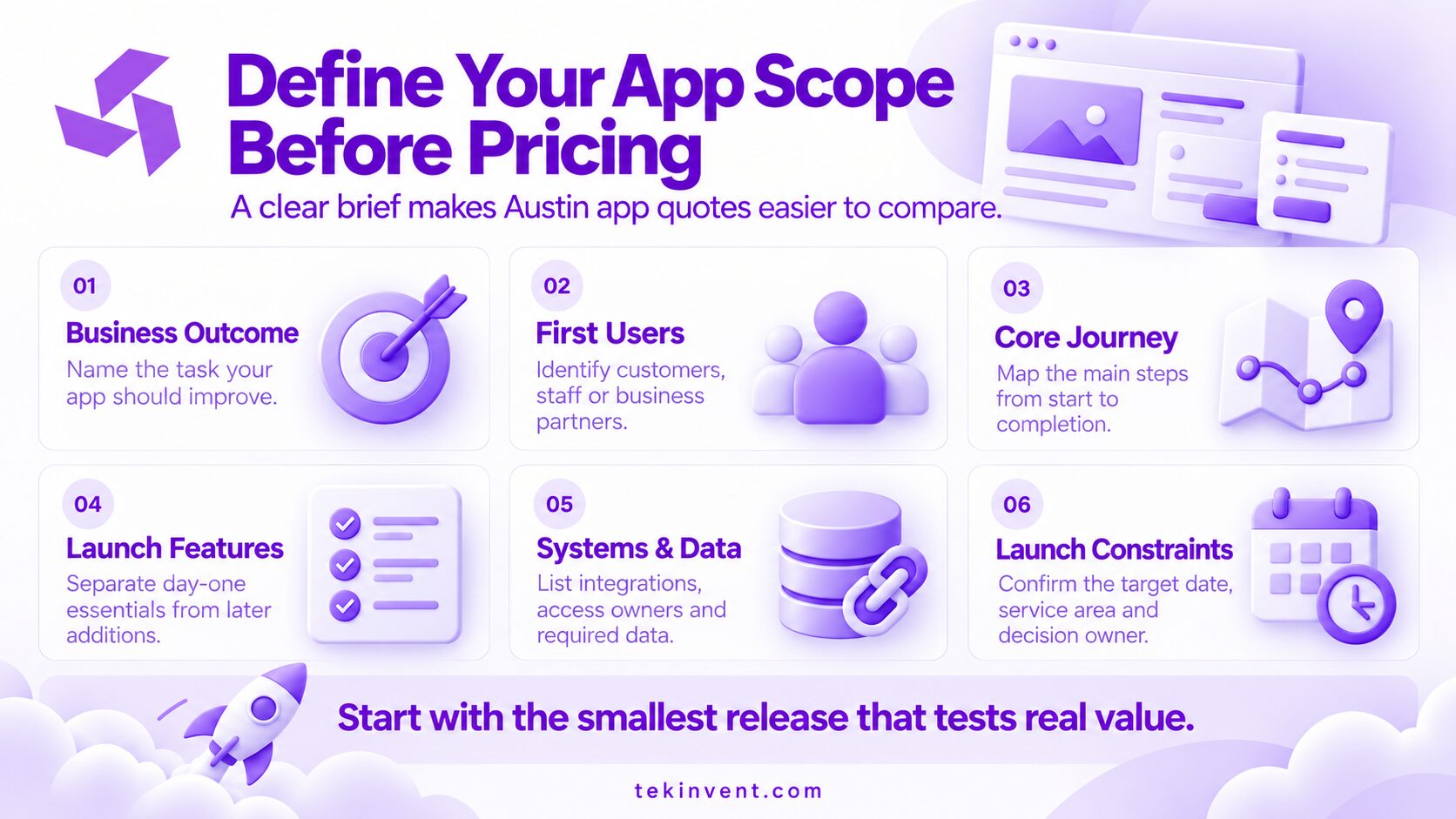
A practical way to scope an Austin app before asking for bids
A short brief lets every provider estimate the same need. It should make the business outcome, initial users, and project boundaries clear.
- Business outcome: the task the app should improve, such as reducing booking calls, enabling repeat orders, or replacing paper job sheets for field staff.
- First users: the people who will use the initial release, such as customers, employees, or business partners.
- Core journey: the main steps from first action to completion, such as selecting a service, choosing a time, and confirming a booking.
- Launch features: what must be ready on day one and what can wait. Loyalty programs, chat, and advanced reporting belong in the first release only if the business case depends on them.
- Systems and data: the POS, CRM, calendar, payment processor, or other software involved, plus the information that needs to move between them.
- Launch constraints: target date, service area, and decision owner. A fixed event date limits how much scope can move.
For a local home-service operator, the first release might cover technician job details and photo submission while leaving route optimization for later. The brief should also say whether technicians need to work offline and sync data later, since that changes what the app must support.
This brief can also show whether a mobile app is the right first investment. If users mainly need information or a simple booking flow, a mobile-friendly website may cover the need without separate app builds. If they need offline work, frequent repeat use, device features, or staff workflows on the go, an app may justify the extra development and upkeep.
How to compare development proposals fairly
A mobile app development company in Austin should be able to estimate the same written brief as other providers. Compare proposals by included work, not by the number of screens or a single total. Discovery, interface design, backend development, QA, launch, and post-launch support can sit in different parts of each quote.
Questions worth covering in a project review:
- Which assumptions could raise the estimate after discovery?
- Are iOS and Android both included, and how will the team test them?
- Who owns the source code, design files, app-store accounts, and cloud accounts?
- Are API or vendor fees, cloud usage, and third-party subscriptions included?
- What testing happens before launch, and who handles app-store feedback?
- What support is available after release, and what does it cost?
When totals differ, have each provider mark assumptions that are still unconfirmed, especially access to internal systems, test data, and approval criteria. Ask for unresolved work to be shown separately so it does not disappear inside a broad contingency.
For an Austin business with staff in operations, dispatch, or storefronts, an in-person workflow session may help surface handoff problems. Office location alone does not show who will do the work or what support is included. Compare the assigned team, relevant project experience, communication cadence, and handoff materials.
Planning an Austin App Budget
Share your workflow and feature priorities with TekInvent for a scope-based cost discussion
Budget for the first year, not only the build
After launch, budget for services and support such as cloud hosting, email or messaging, maps, payment processing, analytics, security updates, device compatibility, and staff time for app content or user support. Costs depend on usage and vendor terms. For each recurring service, request an estimate at a stated usage level and the threshold that changes its billing.
Payment processing, cloud resources, or a licensed data service may add recurring charges. Have providers show how those costs are calculated and what usage assumptions their estimates use.
Set aside a plan for improvements after launch. User feedback may show that a workflow needs rethinking, or a third-party system may change its API. Before work begins, agree on the support period, defect response process, and how enhancements will be estimated. A project quote that ends at store submission leaves those obligations for later.
Where an MVP can reduce risk without creating rework
An MVP is not simply the cheapest possible app. It is a deliberately limited product that can test a business assumption with real users. An Austin fitness studio, for instance, could first test class discovery and booking before adding community features, wearable integrations, and complex rewards.
Limit the first release by audience, platforms, and the main user journey. Keep security, analytics, code ownership, and the data model suitable for the next planned phase. Cutting QA or leaving account access in a vendor’s name may lower the first quote but raise the cost and risk of later changes.
The right MVP budget is the amount needed to test a meaningful question, not a round number borrowed from another company’s estimate. If the team cannot say which assumption the release will validate, revisit the scope before development begins.
Get an Austin app estimate grounded in your workflow
The mobile app development cost in Austin is easier to assess when user flows, integrations, and launch boundaries are clear. Compare written estimates built from the same project brief. A useful proposal makes trade-offs visible and spells out what support continues after release.

Build Smart with The Right Team.
We bring expertise, technology, and trust you look for in your digital journey.