
Healthcare apps work best when they solve a specific care or operations problem without making clinicians and patients manage extra steps. Before choosing features or a platform, Austin providers should map the workflow, identify who will use the app, and determine what systems and data it must handle. That planning helps keep a project focused and surfaces privacy, integration, and rollout needs early.
An app may support appointment requests, patient intake, care instructions, remote visits, or coordination between care teams. These functions have different clinical and operational risks. A scheduling tool can often be scoped differently from an app that sends test results or supports treatment decisions. The intended use should guide the requirements, review process, and technical design.
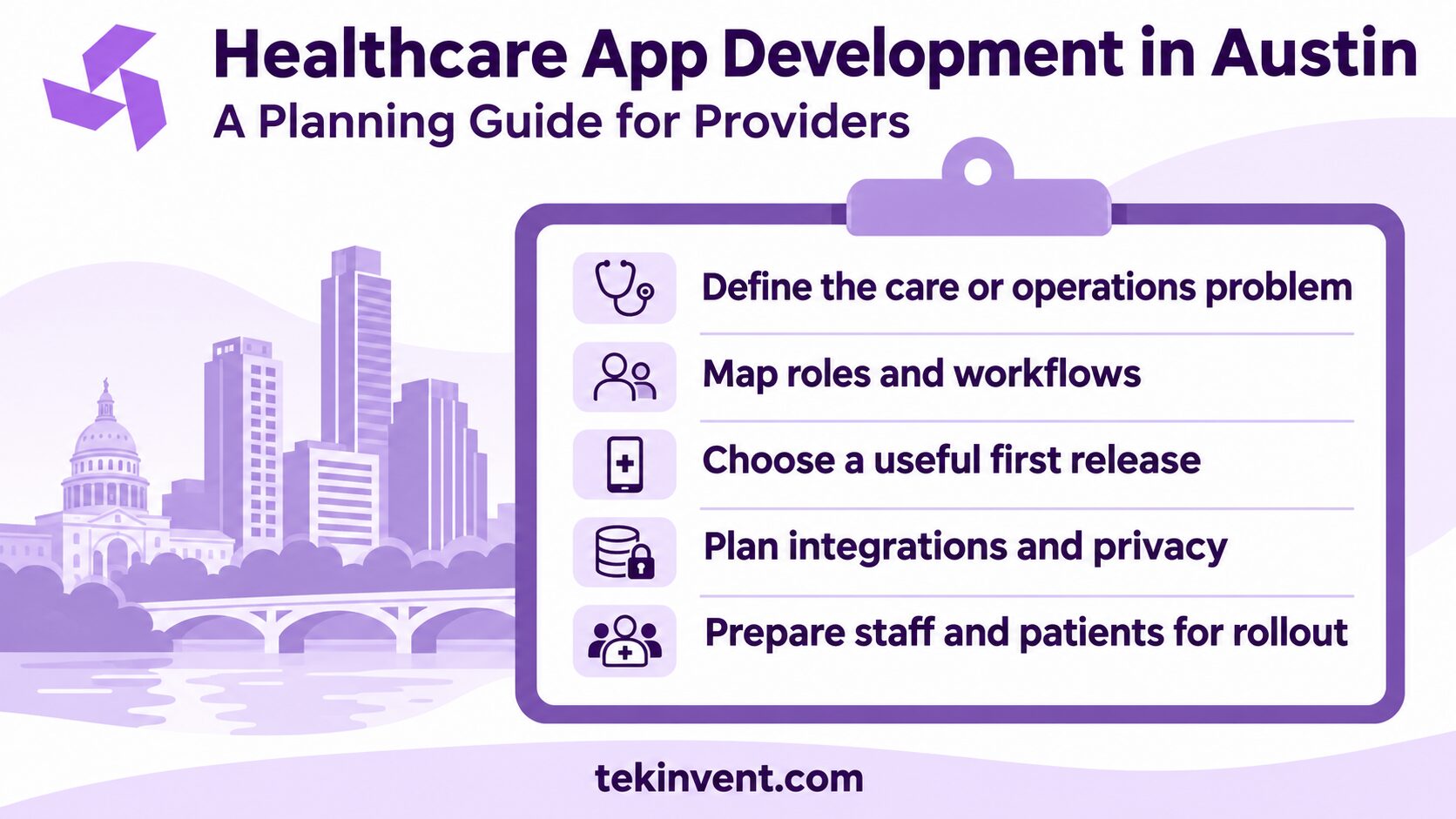
Start with a care or operations problem
Write a short problem statement before discussing screens. Name the user, the situation, and the task that is difficult today. For example: “After a visit, patients do not know which follow-up steps are still open, and staff spend time answering status calls.” This gives the team a problem to investigate rather than an early commitment to a feature.
Map the current process with the people who perform it. Include front-desk staff, clinicians, administrators, and patients where appropriate. Note what happens before and after the task, which tools are involved, and what exceptions commonly occur. The ordinary path matters, but exceptions often reveal why a workflow is frustrating or unsafe.
Then decide what a better outcome would look like. It might be fewer incomplete intake forms, fewer manual handoffs, clearer follow-up instructions, or a shorter time to schedule a visit. Use a measure the organization can actually collect. Avoid promising clinical outcomes that the app has not been designed or evaluated to support.
Identify the users and their responsibilities
A patient app, clinician workspace, and administrative console may share data, but they serve different jobs. List each user group and the actions it needs to take. A patient may update contact information, a clinician may review a submitted history, and an administrator may correct a scheduling issue. Each action should have a clear owner and appropriate access.
Consider differences in device access, language preference, vision, dexterity, reading comfort, and connectivity. These are design inputs, not optional polish. A patient who cannot complete registration without staff assistance may create more work even if the app looks modern. Offer clear error messages, readable content, and an alternative path for users who cannot use a particular feature.
If the provider serves patients in English and Spanish, plan translation and review as part of the content workflow. Clinical terms should be checked by qualified language reviewers, and translated screens need testing for layout and meaning. Simply translating button labels does not make a complete patient experience.
Define the minimum useful release
Build the first release around a complete workflow, not a long checklist of disconnected features. A patient intake app, for example, may need identity confirmation, consent, form completion, a staff review queue, and a way to correct errors. Omitting the staff side can leave the provider with a new source of submissions but no usable process for handling them.
Separate the requirements into three groups: required for safe and useful operation, valuable but deferrable, and outside the current project. Include failure cases in the first group. What happens if an appointment is canceled? If a user submits a duplicate form? If a patient cannot receive a one-time code? If the external system is unavailable?
Run a small prototype test with representative users before building every screen. Ask participants to complete realistic tasks and observe where they hesitate. Do not coach them through the flow unless you are specifically testing a supported, assisted process. Record confusion and workarounds; both can expose a mismatch between how the organization works and how the app assumes it works.
Map integrations before estimating development
Integration work can shape the budget and schedule more than the visual interface. List the systems the app must exchange information with, such as an electronic health record (EHR), scheduling platform, billing system, identity service, or secure messaging tool. For each connection, identify the information that moves, which system is authoritative, and how often the information needs to update.
Clarify what access and documentation are available from each vendor. A system may provide an interface, but the project still needs credentials, permissions, test data, technical documentation, and an agreement about support. Ask who will approve access and who will help troubleshoot if a connection fails.
Avoid duplicate records and unclear ownership. If both the app and the EHR allow staff to edit a phone number, decide which value wins and how conflicts appear. Define how a failed message or delayed data transfer is surfaced. A silent integration failure can leave staff and patients relying on outdated information.
For each integration, plan test cases for normal use, missing data, duplicates, delays, and recovery. A demo using ideal sample records does not confirm that a live workflow will handle real-world exceptions. Include integration testing and staff acceptance in the project plan.
Treat privacy and security as design requirements
Healthcare information needs careful handling, but legal obligations depend on the organization, its role, the data, and the services involved. Determine whether the app will create, receive, maintain, or transmit protected health information on behalf of a regulated organization. Engage privacy and legal experts to assess the applicable requirements; a software vendor should not be expected to make that determination alone.
For systems subject to HIPAA, the organization’s security work includes risk analysis and risk management. Start by mapping where sensitive data enters, travels, and is stored, including analytics, notifications, backups, support tools, and third-party services. Collect only what the workflow requires, restrict access by role, and maintain records that help investigate important actions.
Discuss encryption, authentication, session handling, audit records, backups, monitoring, and incident response with the development team. These are design and operational decisions, not a single “HIPAA feature.” If a cloud provider or other service handles protected data on behalf of a covered entity, determine the required contractual arrangements and safeguards before using it with real information.
Use synthetic or properly de-identified data during development when possible. Do not let convenience lead staff to copy patient information into test systems, logs, or third-party tools without review. Before launch, test access rules and recovery procedures as well as the visible features.
Plan for clinical safety and content ownership
If the app displays clinical instructions, test results, medication information, or decision support, establish who approves the content and how it stays current. A product should make the source and status of important information clear. It should also show users what to do if they believe information is wrong or need urgent help.
Avoid designing a workflow that implies the app is monitoring a patient when no one is actively reviewing alerts. If a team will respond to messages or escalations, define business hours, response expectations, backup coverage, and what happens when a message is not seen. An app should not create a false sense of supervision.
Include clinicians and operations staff in review before release. Ask them to test routine cases and edge cases using a staging environment. Record issues, assign owners, and decide which issues must be resolved before patient use. A formal sign-off should reflect the organization’s actual process and risk tolerance.
Budget around the full project, not just screens
An early estimate should describe assumptions rather than present a single unexplained number. The amount of work depends on the workflow, platform count, integrations, data handling, content, accessibility needs, testing, and ongoing support. A patient-facing app with no external integration has a different scope from a multi-role product connected to clinical systems.
Ask an implementation partner to separate discovery, design, application development, integration, testing, deployment, and post-launch support. This makes it easier to compare proposals and identify missing work. Confirm whether the estimate includes platform fees, vendor access, security review, training, content entry, and coordination with the provider’s IT team.
Plan for recurring costs as well as the initial build. Hosting, third-party services, monitoring, maintenance, security updates, user support, and integration changes can continue after launch. Assign an internal owner for each operational responsibility. A technically complete app can still fail if no one owns content updates or access reviews.
If important requirements remain unknown, use discovery to reduce uncertainty before fixing a full budget. The discovery phase should produce workflow maps, a prioritized requirements list, integration assumptions, a risk register, and a release plan. Those artifacts help both the provider and development team agree on what the estimate covers.
Prepare staff and patients for rollout
Choose a rollout that gives the organization room to learn. A pilot with one team or a defined patient group can reveal training gaps and support needs before broader release. Define what the pilot will measure, who will gather feedback, and what conditions must be met before expanding access.
Training should match each role. Clinicians may need to understand how app-submitted information appears in their workflow; support staff may need steps for account recovery; administrators may need access and reporting guidance. Provide a clear way to report bugs and privacy concerns, and route clinical questions to the appropriate care channel.
Track operational outcomes alongside app usage. A rise in completed forms is not useful if staff must re-enter every answer. Watch for incomplete tasks, support requests, delayed handoffs, and workarounds. Review feedback regularly and make small changes based on what is observed.
A planning checklist for Austin providers
Before approving a build, confirm that the project team can answer these questions:
- Which patient, clinical, or administrative workflow is the app improving?
- Who uses each part of the product, and what actions can each role take?
- What must the first release do from start to finish?
- Which systems exchange data, and who owns each system?
- What privacy, security, clinical, and legal reviews apply?
- How will the provider test the app with staff before patient use?
- Who handles support, content updates, access reviews, and maintenance?
- What evidence will show whether the release improved the workflow?
If a team cannot answer one of these questions yet, make it a discovery task instead of guessing. Clear answers reduce late changes and help keep the project aligned with provider needs.
When the requirements are clear, a mobile app development company in Austin can help turn the approved workflows into a technical scope and delivery plan. Providers can also review TekInvent’s healthcare app development services when evaluating a broader care-focused product.
Plan a Healthcare App Around Care Workflows
TekInvent can help providers map requirements, integrations, and release priorities before development.
Move from idea to a testable plan
Healthcare app development in Austin starts with decisions about the people, work, and data the product will touch. A focused first release, early integration planning, and clear ownership for security and operations give providers a more dependable path from concept to patient use.
Treat the plan as something the team can review and improve. As staff test the workflow and requirements become clearer, adjust the release scope before expanding it. That gives the organization a practical way to learn while keeping clinical and operational needs in view.

Build Smart with The Right Team.
We bring expertise, technology, and trust you look for in your digital journey.