
With most people owning a smartphone today, having a mobile app is essential for businesses to reach customers easily. Entrepreneurs in Houston are taking advantage of this opportunity, and building an app is easier than ever with the right tools.
Using the right mobile app development tools can make the process smooth, fast, and cost-effective. From iOS and Android apps to cross-platform solutions, these tools help create user-friendly and high-performing apps that engage customers and grow businesses.
In this article, we will explore the best mobile app development tools that every mobile app development company Houston can use. We will also share bonus tips to avoid common challenges and save time. With mobile apps becoming central to business success, using the right tools is the key to building apps that are intuitive, functional, and ready for the market.
Let’s dive in and discover the top tools every entrepreneur in Houston should know.
The Top Mobile App Development Tools for Houston Entrepreneurs
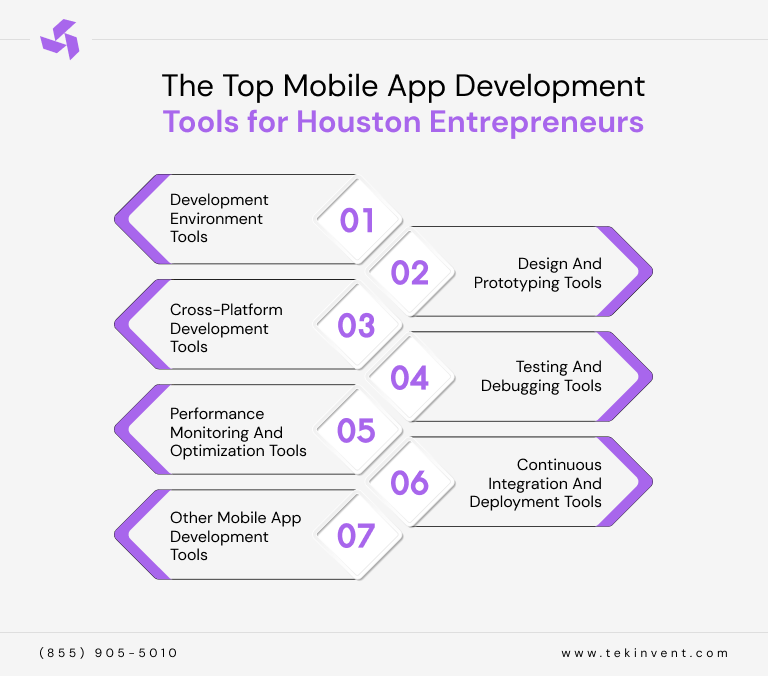
Building a successful mobile app requires the right set of tools. For Houston entrepreneurs, using effective app development tools can save time, reduce costs, and improve the overall user experience. From coding and design to testing and deployment, each tool plays a vital role in creating high-performing, intuitive apps that delight users and support business growth.
1. Development Environment Tools
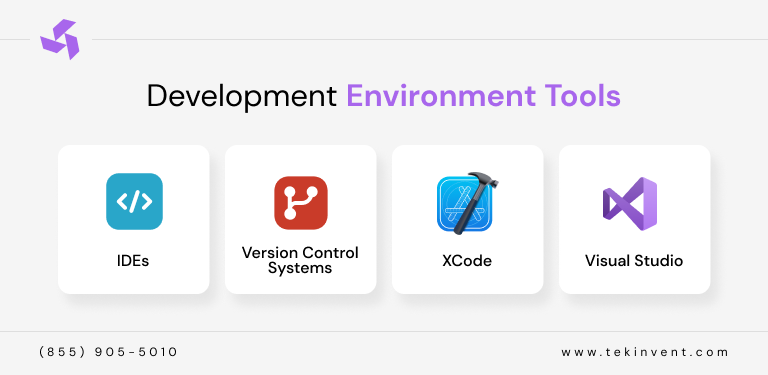
Development environment tools, also called IDEs, are where developers write, test, and debug code. Popular options like Android Studio, Xcode, and Visual Studio provide features such as code completion, syntax highlighting, and real-time error detection. They help streamline development, speed up coding, and ensure apps run smoothly across platforms. Choosing the right IDE is essential for productivity and efficiency.
1.1. Integrated Development Environments (IDEs)
IDEs are software applications that provide developers with tools to write, test, and debug code in one place. They make coding faster and reduce errors by offering features like code suggestions, syntax highlighting, and real-time debugging. Popular IDEs such as Android Studio, Eclipse, and IntelliJ IDEA help developers build mobile apps efficiently and maintain clean, organized code.
1.2. Version Control Systems
Version control systems (VCS) track changes to your code over time, allowing teams to collaborate efficiently. Tools like Git and GitHub let developers manage multiple versions, roll back mistakes, and merge updates safely. For Houston entrepreneurs, using a VCS ensures that development progress is secure, organized, and easy to maintain, even when multiple developers are working on the same project.
1.3. Xcode
Xcode is Apple’s official IDE for building iOS, macOS, watchOS, and tvOS apps. It provides all the tools needed to design, code, and test apps on Apple devices. With features like a visual interface builder, simulator testing, and real-time error checking, Xcode helps developers create high-quality, bug-free applications tailored to iPhone and iPad users.
1.4. Visual Studio
Visual Studio is a versatile IDE from Microsoft that supports app development for Windows, Android, and iOS. With features like code completion, debugging, and integrated testing tools, it allows developers to create cross-platform apps using frameworks like Xamarin. Visual Studio is ideal for entrepreneurs looking to develop scalable, high-performance apps quickly and efficiently.
2. Design and Prototyping Tools
Design and prototyping tools help transform ideas into interactive visual layouts before coding begins. Tools like Figma, Adobe XD, and Sketch allow entrepreneurs to create wireframes, mockups, and prototypes, improving communication with developers and stakeholders. These tools ensure that apps have a user-friendly interface and meet user expectations.
2.1. Sketch
Sketch is a popular design tool for creating user interfaces and app prototypes. It allows designers to build clean, vector-based layouts with ease. Its simple interface and extensive library of plugins make it ideal for Houston entrepreneurs looking to quickly design and iterate app concepts while maintaining a professional and modern look.
2.2. Adobe XD
Adobe XD is a versatile tool for designing and prototyping mobile apps. It lets you create interactive wireframes, mockups, and clickable prototypes to test user flows before development. With collaboration features and integration with other Adobe products, teams can streamline the design process and ensure the app meets user expectations.
2.3. Figma
Figma is a cloud-based design and prototyping tool that allows real-time collaboration. Teams can work together on wireframes, high-fidelity designs, and interactive prototypes simultaneously. Its cross-platform accessibility makes it perfect for Houston entrepreneurs who want efficient feedback, faster iterations, and a smooth handoff to developers.
3. Cross-Platform Development Tools
Cross-platform tools let developers build apps for multiple platforms using a single codebase. Frameworks like Flutter, React Native, and Xamarin save time, reduce costs, and maintain consistent functionality across iOS and Android. They are ideal for startups and entrepreneurs looking to reach a wider audience quickly.
3.1. React Native
React Native is a powerful framework by Meta that allows developers to build mobile apps for both iOS and Android using a single codebase. It offers faster development, strong community support, and access to native features, making it a smart choice for Houston entrepreneurs who want cost-effective and high-quality apps.
3.2. Flutter
Flutter, developed by Google, is a modern UI toolkit for building fast, visually rich mobile applications from one codebase. It provides smooth performance, customizable widgets, and quick development cycles. For startups and growing businesses in Houston, Flutter is ideal for creating scalable and visually consistent apps.
3.3. Xamarin
Xamarin is a Microsoft-backed cross-platform framework that uses C# to build apps for iOS and Android. It allows developers to share code across platforms while maintaining native performance and functionality. Xamarin is a great option for businesses already using Microsoft technologies and enterprise-level systems.
4. Testing and Debugging Tools
Testing and debugging tools ensure apps run without errors and deliver a seamless experience. Tools such as Appium, Selenium, and Firebase Test Lab allow developers to identify bugs, test performance, and fix issues before launch. Regular testing improves app reliability and user satisfaction.
4.1. Appium
Appium is an open-source automation testing tool that supports testing for both Android and iOS apps. It allows developers to write tests in multiple programming languages and test real devices and emulators. This helps Houston entrepreneurs ensure their apps work smoothly across different devices and operating systems.
4.2. XCTest (iOS) and Espresso (Android)
XCTest and Espresso are native testing frameworks for iOS and Android. They are designed for fast, reliable, and accurate testing of mobile applications. These tools help developers catch bugs early, improve app stability, and ensure a high-quality user experience.
4.3. Firebase Test Lab
Firebase Test Lab allows developers to test their apps on a wide range of real devices hosted by Google. It helps identify crashes, performance issues, and compatibility problems before launch. This makes it easier to deliver stable and reliable apps to users.
4.4. Selenium
Selenium is widely used for automated testing of web applications and mobile web apps. It helps teams test app workflows, user interactions, and performance across browsers and devices. For businesses building web-based mobile solutions, Selenium ensures quality and consistency.
5. Performance Monitoring and Optimization Tools
Performance monitoring tools track app behavior, speed, and crashes in real time. Solutions like New Relic, Firebase Analytics, and AppDynamics help identify bottlenecks, optimize code, and enhance app stability. Optimized apps provide better user experience and retain customers longer.
5.1. New Relic
New Relic helps developers monitor app performance in real time. It provides insights into crashes, load times, and user experience issues. Houston entrepreneurs can use it to quickly identify problems and improve app speed, stability, and overall performance.
5.2. Instabug
Instabug is a powerful tool for bug reporting and performance tracking. It allows users to report issues directly from the app, complete with screenshots and logs. This makes it easier for teams to fix problems faster and improve app quality.
5.3. Android Profiler
Android Profiler is a built-in tool in Android Studio that helps developers track CPU usage, memory, and network activity. It is useful for finding performance bottlenecks and optimizing app speed and battery usage.
5.4. Firebase Analytics
Firebase Analytics provides detailed insights into user behavior, engagement, and app performance. It helps businesses understand how users interact with their apps and where improvements are needed for better user experience and retention.
5.5. AppDynamics
AppDynamics offers advanced monitoring for mobile apps and backend systems. It helps track performance issues across the entire app environment. This allows businesses to optimize performance, improve reliability, and deliver a smoother user experience.
6. Continuous Integration and Deployment Tools
Continuous integration and deployment (CI/CD) tools automate building, testing, and releasing apps. Tools like Jenkins, Bitrise, and GitHub Actions allow developers to deploy updates faster, minimize errors, and ensure seamless app updates. CI/CD is essential for agile development teams.
6.1. Jenkins
Jenkins is a popular automation tool used for continuous integration and deployment. It helps teams automatically build, test, and deploy mobile apps, reducing manual work and errors. Houston entrepreneurs can use Jenkins to speed up development cycles and ensure consistent, reliable releases.
6.2. Travis CI
Travis CI is a cloud-based CI tool that automates testing and deployment workflows. It integrates easily with GitHub and other repositories, making it ideal for agile teams. It helps developers catch issues early and maintain high code quality throughout the project.
6.3. Fastlane
Fastlane is designed specifically for mobile app automation. It simplifies tasks like app building, testing, beta releases, and app store deployment. This helps teams save time, reduce mistakes, and release updates faster and more efficiently.
7. Other Mobile App Development Tools
Additional tools include version control systems like Git, cloud storage for app assets, and analytics platforms to track user engagement. Tools such as Trello, Slack, and Google Firebase help manage projects efficiently and keep the development process smooth from start to finish.
7.1. Charles Proxy (Network Traffic Monitoring)
Charles Proxy helps developers monitor and analyze network traffic between mobile apps and servers. It is useful for debugging API calls, testing performance, and identifying data transfer issues, ensuring apps run smoothly and securely.
7.2. Postman (API Development and Testing)
Postman is a powerful tool for building, testing, and managing APIs. It allows developers to validate requests, responses, and integrations, making it easier to connect mobile apps with backend services reliably.
7.3. Git
Git is a widely used version control system that helps teams manage code changes, track progress, and collaborate efficiently. It ensures code stability and allows developers to work on features without breaking the main project.
7.4. Trello
Trello is a simple project management tool that helps teams organize tasks, track progress, and manage workflows visually. It improves team coordination and keeps projects on schedule.
7.5. Slack
Slack is a team communication platform that supports real-time messaging, file sharing, and integrations with development tools. It helps teams collaborate faster and resolve issues quickly.
7.6. Google Firebase
Google Firebase offers backend services like authentication, databases, cloud storage, analytics, and push notifications. It helps entrepreneurs build scalable, secure, and feature-rich mobile apps without heavy infrastructure management.
Final Thoughts
Building a successful mobile app in today’s competitive market is not just about having a great idea, it is about using the right tools to turn that idea into a reliable, high-performing product. For Houston entrepreneurs, the tools you choose can directly impact development speed, app quality, user experience, and long-term growth.
From development environments and design tools to testing, performance monitoring, and deployment platforms, each category plays a critical role in creating apps that are stable, secure, and user-friendly. When used together, these tools simplify the development process, reduce costs, and help teams avoid common mistakes that slow projects down.
Whether you are launching a startup app or scaling an existing business, investing in the right mobile app development tools gives you a strong foundation for success. With the right technology stack and a clear strategy, Houston entrepreneurs can build apps that not only meet market demands but also create real business impact, customer trust, and long-term growth.

Build Smart with The Right Team.
We bring expertise, technology, and trust you look for in your digital journey.