
MVP app development in Miami starts with a choice: what should the first release help you learn? A minimum viable product gives real users a way to complete a core task, while limiting the work to what is needed for that test. Planning the release around one audience and one workflow helps founders make better decisions about design, development, integrations, and launch.
An MVP is a working product that tests an assumption about a problem or business model. Users need to carry out a real task, while nonessential roadmap features can wait until usage and feedback show why they matter.
Define the first release outcome
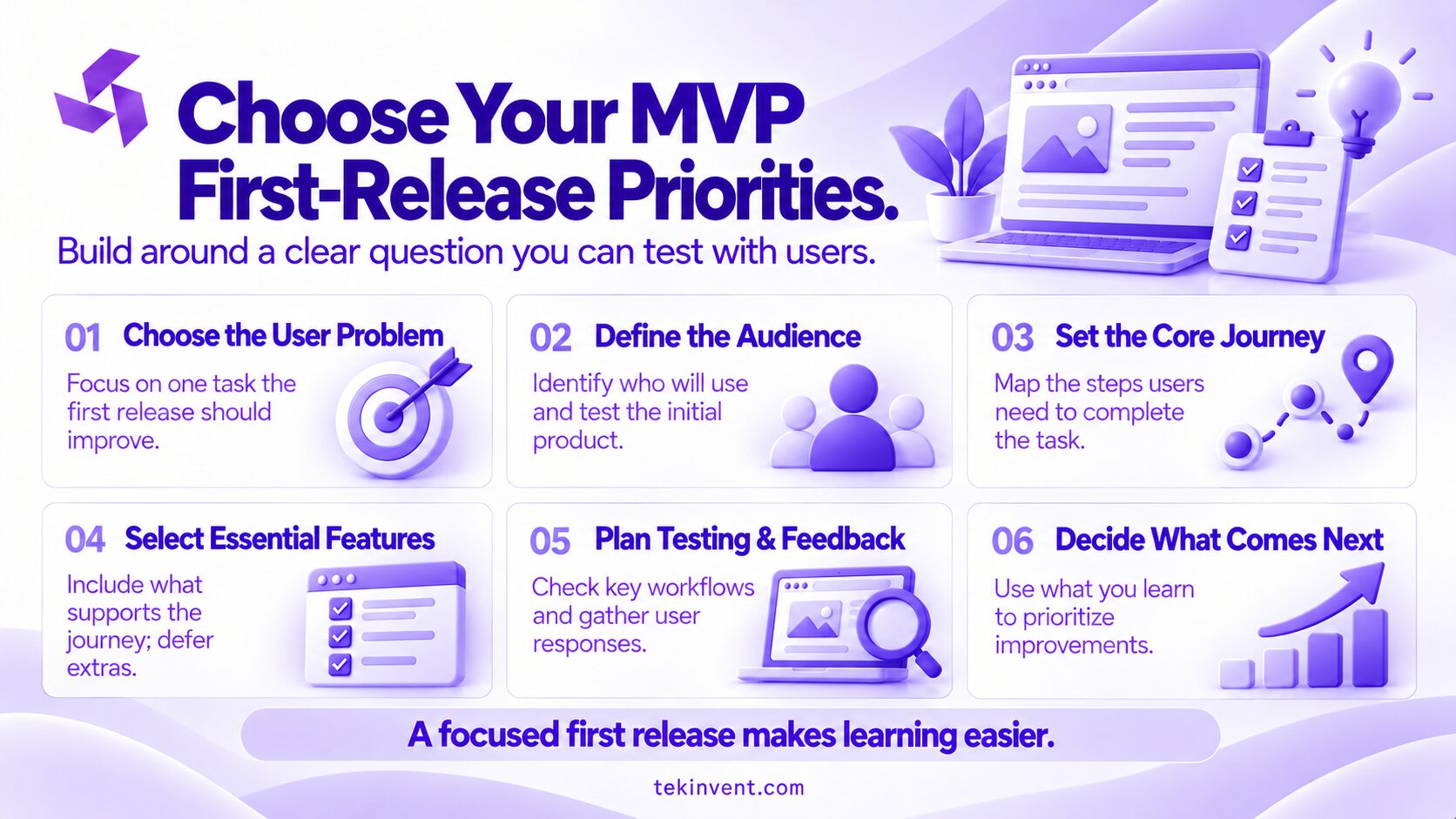
Before estimating cost or choosing a platform, write down the decision the release should inform. A founder may want to learn whether customers will book through an app, whether employees can complete a workflow without paper, or whether a business will pay for a service. The release should create observable evidence related to that question.
Be specific about the user and the situation. “A better travel app” could mean planning, booking, payments, or on-trip support. “A visitor needs to confirm a booked activity and share the meeting details with a companion” is narrow enough to investigate. The problem statement guides interviews, product scope, and success measures.
Describe the user’s current process
Ask prospective users to describe their last experience with the problem, the tools and people involved, and what happened when something went wrong. This uncovers constraints a feature brainstorm can miss.
Listen for differences between user groups. A hotel guest, property manager, local tour operator, and restaurant owner may all interact with a hospitality product, but their needs and decision processes differ. Start with the group whose problem is clearest and whose workflow you can test.
Do not treat positive comments as demand. Someone may say an idea sounds useful while continuing to use an existing process. If adoption is the assumption, test a behavior such as completing a request, returning to the service, or agreeing to a pilot with clear terms.
Validate the problem before building the app
Use the least expensive method that answers the current question. Interviews help clarify whether the problem is real and how people describe it. A paper sketch or clickable prototype can test navigation and comprehension. A concierge pilot, where a person handles some work manually, can test the service process before automation is justified.
Validation methods have limits. A prototype tests comprehension, not reliability of an integrated product. A small pilot can uncover friction without representing a broader market. Record what each test can establish and what remains unknown.
Create a simple validation brief
Record the assumption, the people you will learn from, the test, and the result that would change your decision. For example, a local booking concept might test whether a guest can find an available time and complete a request. If the booking process is manual during the pilot, tell participants what to expect and track how much staff effort the process requires.
Include a decision rule. If users cannot understand the booking path, revise it. If they complete it but do not return when the need recurs, investigate whether the problem is frequent enough. If operations cannot fulfill requests reliably, address the service model before adding features.
Keep version one focused
Map the core workflow from the user’s first action to a clear outcome. Include the steps, data, roles, and important failure cases. A food ordering product, for instance, may need a customer to browse, place an order, and receive confirmation. If staff must accept or reject the order, that operational step is part of the product experience even if employees use a simple internal view.
For each feature, ask:
- Is it required to complete the main user task?
- Is it necessary for safety, privacy, or a confirmed business obligation?
- Does it help answer the release’s central question?
- Could a manual step answer the same question during a small pilot?
- What user or operational problem appears if it is deferred?
Separate launch requirements from future ideas such as loyalty programs, advanced reporting, referrals, and personalization. Record why each is deferred for review when user evidence supports the work.
Include the roles the workflow needs
An app may serve customers, operators, and administrators. Each role can require different permissions, views, and notifications. A first release should include the roles needed to complete and support the core task. If an employee can safely manage a limited process manually, an elaborate administrative console may be unnecessary at the start.
Manual work still needs a plan. Identify who performs it, how activity is recorded, and what volume or delay would make automation worthwhile. Without clear ownership, a temporary workaround can create inconsistent service and leave the team unable to understand where the process is failing.
Choose a platform around user behavior
The first release could be a responsive web app, a native mobile app, or a cross-platform application. Choose based on where the user expects to complete the task and what device capabilities it requires. Browser access may suit an occasional reservation or business dashboard. A mobile app may fit a repeated workflow that relies on push notifications, camera access, offline use, or location.
Ask the development team to explain the practical implications of each option, including testing and maintenance. A cross-platform approach can share code, but it still needs checks on target devices. Separate native apps can offer platform-specific control, while requiring work for each platform. The right option depends on requirements, not a general preference for one technology.
Also identify the backend services and data connections the product needs. Accounts, payments, maps, inventory, customer records, and analytics can all add scope. Confirm who owns each connected system, what access can be provided, and what happens when data is missing or a service is unavailable. Investigate a critical integration early enough to avoid basing the project plan on an assumption.
Plan for privacy, security, and operations
List what information the app collects and why. Decide who needs access, how records can be corrected, and how long data should be kept. Collecting fewer details can reduce friction and simplify the work required to protect information.
Products that handle financial, health, location, or other sensitive data may carry legal or contractual obligations. Requirements vary with the product and organization. Consult qualified legal and security professionals to determine what applies, then make those decisions part of the product and test plan.
Plan the operational work too. Someone will need to monitor the app, respond to user questions, handle failed transactions or requests, and decide which feedback belongs in the next release. If an outside partner will provide support, agree on what is covered and who can approve urgent fixes.
Estimate the full first-release effort
Development cost depends on scope, team structure, technical uncertainty, and delivery expectations. An estimate should account for discovery, design, engineering, testing, deployment, and initial support. It may also include third-party services or specialist review. Confirm current vendor pricing directly.
Give every provider the same brief describing the user, problem, workflow, platforms, integrations, data concerns, and launch conditions. Ask each to state assumptions, exclusions, and dependencies so estimates use a comparable definition of “MVP.”
Review whether the proposal explains:
- Which user journeys and roles are included.
- What design and accessibility work is covered.
- Which backend, integrations, and data tasks are included.
- How the product will be tested and released.
- What you must provide, such as decisions or system access.
- How scope changes are assessed and approved.
- Who owns code, accounts, credentials, and documentation.
- What post-launch support entails.
For a Miami project that needs custom workflows or system integrations, a software development company in Miami can help discuss the technical scope and delivery approach.
Give Your Miami MVP a Clear First Release
TekInvent can help turn your core product assumption into a focused build plan.
Prepare the launch before the code is finished
Release readiness includes more than publishing an app. Confirm users can complete the task independently. Check errors, permissions, data handling, and critical integrations on the devices and networks users rely on.
Decide how users will be invited and supported. For a pilot, explain what is manual and where to report problems. A public release needs support ownership, privacy information, monitoring, and issue response. Match the checklist to your audience and product risk.
Rehearse the user task and simulate a failure, such as missing information, a rejected payment, or a delayed response. Confirm users receive a clear next step and staff know how to recover.
Decide how you will evaluate the MVP
Choose measures that connect to the original question. For a booking workflow, the team may track whether users finish a request, how often staff need to correct it, and whether users book again when the need recurs. For a business tool, useful signals may include completion time, error frequency, or how often employees return to the old method.
Numbers need context. A user may abandon a task because a time is unavailable, not because the interface is confusing. Pair product data with conversations and support notes; track metrics tied to your question.
Before launch, set a review date and specify what the team will decide. Evidence might support continuing with the current workflow, changing the audience, revising the product, or pausing additional development. A clear decision rule keeps the product plan connected to what the release was meant to test.
Common first-release planning mistakes
Putting the roadmap into version one
Stakeholders may see the first screens and suggest more capabilities. Capture the suggestions and evaluate them against the release goal. Add a feature only when it supports the core workflow, a confirmed obligation, or a learning question that cannot be answered another way.
Choosing features before understanding operations
An app may automate a process that the business itself has not defined. Map who responds, who approves, and how exceptions are handled. If those decisions are uncertain, prototype the service process before building a complex workflow around it.
Underestimating support work
Even a small pilot produces questions and unexpected cases. Assign someone to monitor issues and make decisions. If users have no clear way to get help, their feedback may arrive too late to inform the next release.
Treating launch as the finish line
The first release is the beginning of product learning. Reserve time for observation, defect resolution, and a decision about the next step. The team should know who will review evidence and how new scope will be approved.
Turn early feedback into a product decision
After users try the MVP, compare behavior with the original assumption. Where did users need help? Which manual tasks consumed staff time? Which requests reflect a recurring problem?
Prioritize the next release around observed friction and the product’s purpose. A repeated failure in the core workflow may need attention before a new feature. If the test does not support the original direction, revise the problem statement or stop investing in that path. Learning early is the point of keeping the first release focused.
For Miami founders, a well-planned MVP is a product experiment with a defined audience, a usable core workflow, and a decision process for what follows. Clear scope helps the team build only what the first test requires and gives the business a sound basis for its next development investment.

Build Smart with The Right Team.
We bring expertise, technology, and trust you look for in your digital journey.