
Your business depends on an older application. Employees know its workarounds, important reports still run through it, and replacing it feels risky. Meanwhile, maintenance takes longer, integrations become harder, and small changes keep disrupting daily operations.
Where should you start?
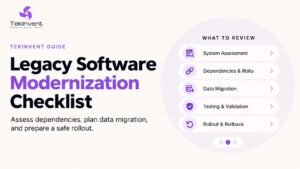
A legacy software modernization checklist helps you assess the existing system, decide what needs to change, and plan a migration that protects critical workflows. It should cover business priorities, application dependencies, data quality, security, budgeting, testing, rollout, and recovery.
The first decision is whether to retain, improve, or replace specific parts of the system. You can make that decision more confidently once you understand what the application does—and what your business would lose if it stopped working.
What Is Legacy Software Modernization?
Legacy software modernization means updating an existing application so it can continue meeting business needs. Depending on the system, this may involve improving its code, upgrading infrastructure, replacing unsupported components, redesigning integrations, or rebuilding selected workflows.
An application’s age alone does not determine whether it needs modernization. A stable older system may still serve its purpose. The stronger warning signs are operational limitations: changes are difficult, support is ending, important integrations fail, or employees depend on manual workarounds.
Modernization should address those limitations while preserving useful business rules, historical information, and essential processes.
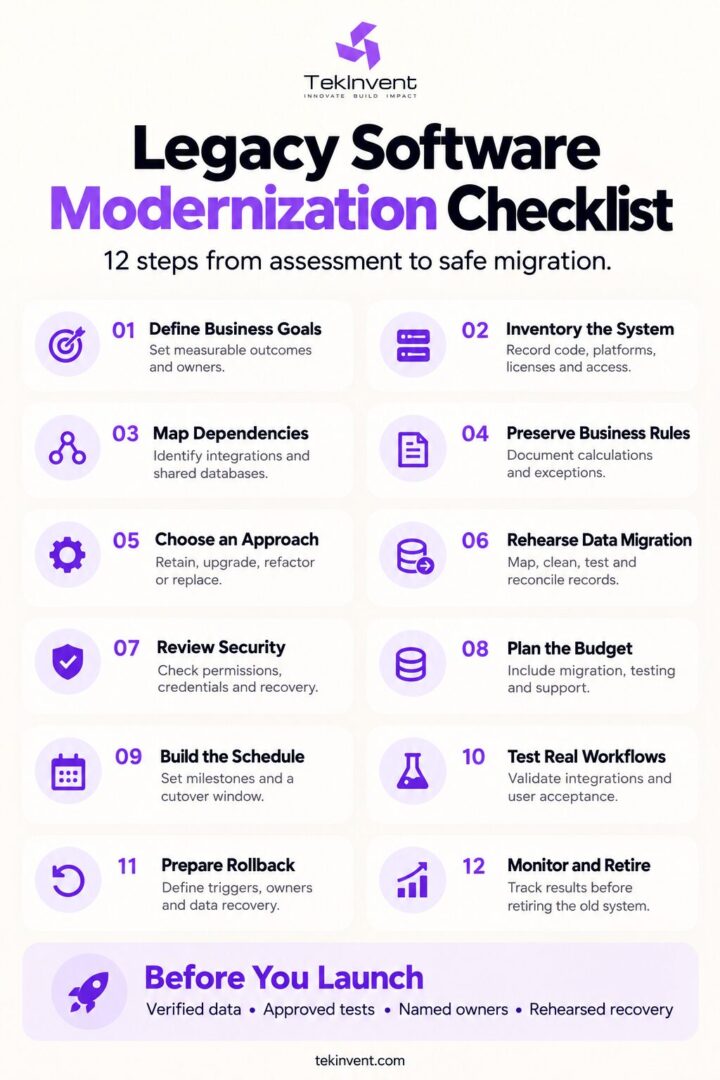
The Legacy Software Modernization Checklist at a Glance
Use this checklist before approving a migration budget or committing to a replacement platform.
| Checkpoint | Evidence to collect before moving forward |
| Business objectives | Defined problems, baseline metrics, and success criteria |
| Application inventory | Components, versions, ownership, and deployment records |
| Dependency mapping | Connected systems, shared databases, and scheduled jobs |
| Business-rule discovery | Documented workflows, exceptions, and calculations |
| Modernization approach | A justified decision for each major component |
| Data migration | Mapping, cleanup rules, validation, and trial results |
| Security review | Access controls, unsupported components, and recovery gaps |
| Budget and schedule | Assumptions, milestones, migration effort, and ongoing costs |
| Testing | Business acceptance criteria and integration test results |
| Rollout and rollback | Cutover steps, recovery triggers, and responsible owners |
| Post-launch ownership | Monitoring, support, documentation, and retirement plan |
Each checkpoint should have a named owner. Recording a task as “complete” is useful only when the team can show the evidence behind it.
1. Define the Business Problem Before Choosing Technology
Start with the work the system prevents your team from doing efficiently.
Are employees entering the same information twice? Does an unreliable integration delay orders? Can only one person maintain an important reporting tool? Does the application struggle during peak demand?
Convert those concerns into measurable objectives.
For example:
- Reduce manual order reconciliation.
- Shorten the time needed to produce a weekly report.
- Remove reliance on an unsupported component.
- Improve the reliability of a critical integration.
- Make routine updates easier to test and release.
Record the current baseline before work begins. Without it, the team may deliver a new platform without knowing whether it improved the original problem.
Checklist: Identify the affected workflow, its business owner, the current limitation, and the result that would justify the investment.
2. Build an Inventory of the Existing Application
Before changing the system, document what exists and who controls it.
Your inventory should include:
- Source-code repositories and access permissions.
- Frameworks, libraries, runtime versions, and operating systems.
- Databases, file storage, and backups.
- Hosting environments and deployment procedures.
- Third-party subscriptions and software licenses.
- Background jobs, reports, and administrative tools.
- Available documentation and known defects.
Confirm that the team can reproduce a working build and deploy it into a suitable test environment. Missing source code, expired licenses, or undocumented deployment steps can change the project’s scope significantly.
Assign an owner to each important component. If no one understands a component, record that uncertainty as a discovery task.
3. Map Dependencies and Hidden Connections
A legacy application rarely operates alone. It may exchange information with accounting software, a CRM, payment systems, warehouse tools, or customer-facing applications.
Some connections are easy to overlook: a nightly file export, a spreadsheet macro, a shared database table, or an email-triggered job.
For every dependency, record:
| Question | Why it matters |
| Which system sends and receives the information? | Establishes responsibility for the connection |
| What data moves between them? | Defines mapping and validation needs |
| When does the transfer happen? | Reveals timing and cutover constraints |
| What happens when the connection fails? | Identifies operational consequences |
| Who maintains the integration? | Provides an escalation and approval owner |
Microsoft’s migration assessment guidance emphasizes understanding application components and dependencies before migration. This is particularly relevant when several applications share databases or integration paths.
Checklist: Confirm that every critical connection has been documented and included in the migration test plan.
4. Preserve Business Rules Before Replacing Code
Older applications often contain rules that employees rely on but cannot find in formal documentation.
Examples include customer-specific discounts, invoice adjustments, inventory allocation rules, approval thresholds, and exceptions for particular accounts.
Interview the people who use the application. Observe real transactions, including unusual cases, rather than relying only on a feature list.
An illustrative example: a distributor may have a legacy ordering system that applies special freight rules to certain customers. Rebuilding the order screen without preserving those rules could produce incorrect totals even if the new interface works perfectly.
Create test cases for these behaviors before replacing the relevant functionality.
Checklist: Document critical calculations, approval rules, exceptions, and expected outputs.
5. Choose the Modernization Approach Component by Component
Different parts of the application may need different treatment.
| Approach | When to consider it |
| Retain | The component remains reliable and meets its requirements |
| Upgrade or replatform | Infrastructure or platform limitations are the main problem |
| Refactor | Useful functionality needs improvements to its internal structure |
| Replace a module | One workflow creates disproportionate risk or maintenance effort |
| Rebuild | Fundamental limitations make incremental improvement impractical |
| Retire | The functionality no longer provides enough business value |
Compare each option against cost, operational disruption, maintainability, and business value.
A gradual replacement may be appropriate when individual workflows can move independently. AWS describes the strangler fig pattern as an approach for incrementally replacing application functionality. Its suitability depends on the system’s architecture and dependencies.
Do not assume that cloud migration, microservices, or a full rewrite is automatically the best choice.
6. Prepare and Rehearse Data Migration
Data migration requires more than copying records into a new database.
Existing information may contain duplicates, missing identifiers, inconsistent dates, obsolete records, or values that no longer match the new application’s structure.
Before migration:
- Identify the records that must move.
- Decide what should be archived or excluded.
- Map old fields to the new structure.
- Define cleanup and transformation rules.
- Validate relationships between records.
- Run trial migrations.
- Compare the results with the source system.
Validation should check business meaning as well as record counts. Matching the number of invoices is insufficient if balances, customer associations, or payment status are incorrect.
Also decide how to handle changes made between the trial migration and final cutover.
Checklist: Approve a migration reconciliation report that includes totals, exceptions, missing records, and unresolved discrepancies.
7. Review Security, Access, and Recovery
Modernization provides an opportunity to address known security weaknesses.
Review unsupported dependencies, shared accounts, excessive permissions, exposed credentials, and gaps in logging or backups.
Define who should access each function and whether permissions differ by department, role, or customer account. Remove unnecessary access rather than copying every old permission into the replacement.
Test backup restoration. A backup file is useful only when the team can restore the information and bring the application back into operation.
Checklist: Confirm access ownership, credential handling, security testing, and a demonstrated recovery procedure.
8. Budget for the Transition, Not Just the New Code
A realistic modernization budget includes discovery, dependency analysis, data cleanup, integration work, testing, training, and the period when old and new systems may run together.
Account for ongoing costs such as hosting, monitoring, support, and software licenses. Include the effort required to retire the old system safely.
Ask for estimates that state their assumptions. Which integrations have been inspected? How much historical data will move? Are migration rehearsals and employee training included?
For broader budgeting context, TekInvent’s software development cost guide explains factors that affect project scope and investment. A modernization estimate should additionally account for the condition of the existing system and the transition between environments.
Checklist: Separate confirmed work from unresolved assumptions, and record how new discoveries will affect the budget.
9. Build a Migration Schedule Around Business Operations
Plan milestones around validated outcomes:
- Assessment completed.
- Architecture and migration approach approved.
- First workflow ready for testing.
- Trial migration reconciled.
- Business acceptance completed.
- Cutover readiness approved.
- Post-launch stabilization completed.
Include time for stakeholder decisions, access approvals, third-party coordination, and migration rehearsals.
For a US business, the cutover window may also need to account for multiple time zones, warehouse hours, customer support coverage, and month-end financial processes.
TekInvent’s software development timeline guide provides context on development stages and scheduling variables. For modernization, add explicit milestones for existing-system assessment, migration validation, and operational handover.
Checklist: Confirm the cutover window, required staff availability, and business periods when changes should be avoided.
10. Test Real Workflows Before Launch
A replacement application should pass more than screen-level checks.
Test complete workflows across systems: an order moving into fulfillment, an invoice reaching accounting, or a customer update appearing in connected applications.
Include:
- Normal and exceptional transactions.
- Different user roles and permissions.
- Integration failures and retry behavior.
- Migrated historical records.
- Expected peak usage.
- Backup restoration and recovery.
- Business-user acceptance.
Where appropriate, compare outputs from the old and new systems using the same test inputs. Investigate differences before approving the replacement.
Checklist: Obtain business-owner approval based on documented results and agreed acceptance criteria.
11. Write a Rollout and Rollback Plan
The rollout plan should state what happens, in what order, and who is responsible.
Define when data changes pause, when final migration begins, how traffic moves to the replacement, and which checks must pass before users resume work.
The rollback plan needs equally clear detail:
- What failure triggers a rollback?
- Who can authorize it?
- How long will recovery take?
- What happens to transactions created after cutover?
- How will users and customers receive updates?
Returning traffic to the old application may be straightforward; reconciling new transactions can be much harder. Plan both.
Checklist: Rehearse the recovery steps and verify that rollback remains possible at each major cutover stage.
12. Monitor the New System and Retire the Old One Safely
After launch, monitor application errors, integration failures, data discrepancies, and the business metrics defined at the beginning.
Assign support owners and establish an escalation process. Record known limitations, operating procedures, and maintenance responsibilities.
Retire the legacy system only after confirming that required workflows, records, reporting, and recovery arrangements are available elsewhere. Remove obsolete access and infrastructure when retention requirements and business needs allow.
Checklist: Approve a retirement plan with accountable owners and evidence that remaining dependencies have been resolved.
Questions to Ask Before Approving Modernization
Before committing to the project, ask the team:
- What evidence supports the proposed approach?
- Which business rules and dependencies remain uncertain?
- How will migrated data be reconciled?
- What must pass before launch approval?
- How will transactions be protected during rollback?
- Who will own the application after handover?
Clear answers help you compare proposals and identify work that an initial estimate may have missed.
Plan Your Next Step With TekInvent
If your existing application is becoming difficult to maintain, start by documenting its most important workflow, connected systems, and recurring failures.
Then discuss those findings with TekInvent through its custom software development services. Share what the application currently does, where it creates operational friction, and what information must survive the transition.
That context gives the discussion a concrete starting point: which components need attention, what a migration must preserve, and what evidence is needed before committing to a larger project.

Build Smart with The Right Team.
We bring expertise, technology, and trust you look for in your digital journey.