
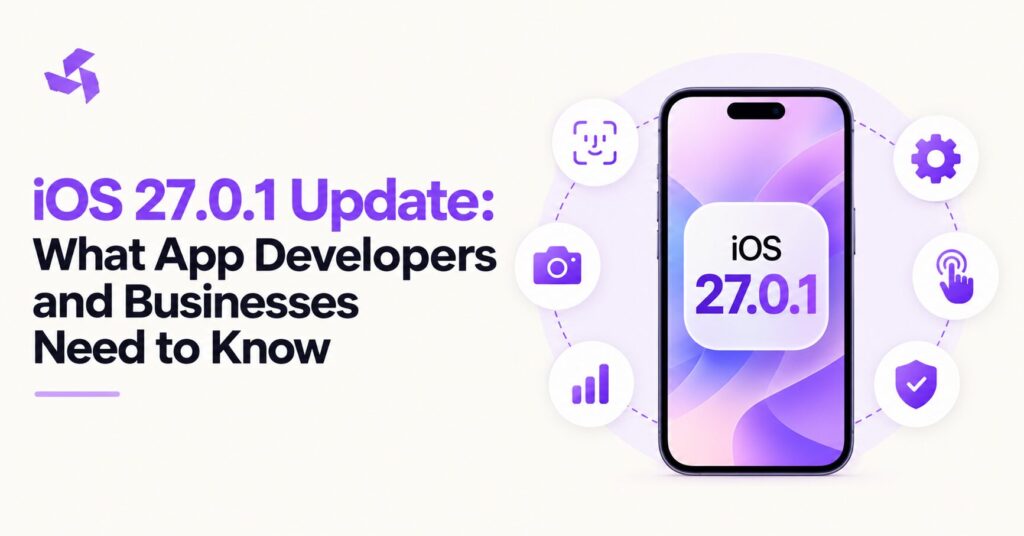
Apple released iOS 27.0.1 on September 28, 2026, shortly after the wider iOS 27 rollout. Apple lists the update as build 24A446, and the release is primarily a bug fix update rather than a major feature release.
That distinction matters for businesses.
A minor operating system update may look less important than a major iOS release, but even a small update can affect real business applications. Authentication, camera features, touch interactions, navigation, third party SDKs, performance, and user flows can behave differently after an operating system change.
For app owners, the important question is not simply, “What did Apple fix?”
The better question is:
Does our existing application still behave correctly on iOS 27.0.1?
That is where businesses and development teams should focus.
This guide explains what changed in iOS 27.0.1, which business app functions deserve testing, how to approach compatibility checks, and when an app update may actually be necessary.
What Is iOS 27.0.1?
iOS 27.0.1 is the first point update following the release of iOS 27.
Apple released it on September 28, 2026. The update focuses on fixing issues rather than introducing a large set of new developer features.
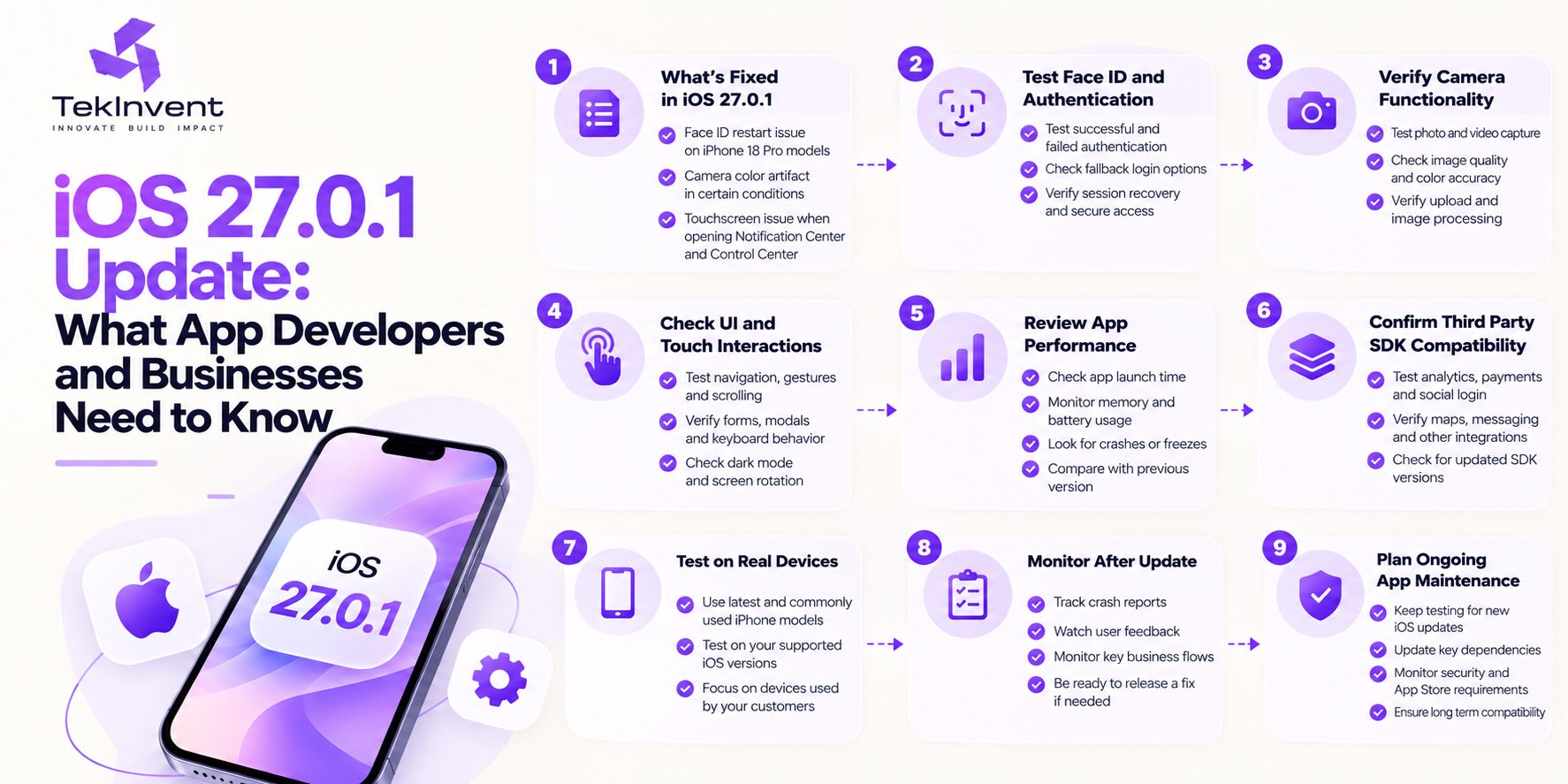
Reported fixes include an issue where iPhone 18 Pro and iPhone 18 Pro Max devices could unexpectedly restart after Face ID failed to authenticate, a camera color artifact affecting some photos captured under specific conditions, and a touchscreen issue that could occur when Notification Center and Control Center were opened at the same time. MacRumors
For normal users, these may look like device level fixes.
For businesses, however, each one points to an area that may deserve regression testing inside a real application.
An app may rely on Face ID.
It may use the camera.
It may include gesture heavy interfaces.
It may display sensitive content after biometric authentication.
It may use third party SDKs that interact differently after an OS update.
The update itself may be small, but the effect on a business workflow can be significant if one of these functions is important to the product.
iOS 27.0.1 Is Mainly a Bug Fix Release
One important thing to understand is that iOS 27.0.1 is not the same type of release as iOS 27.
The larger iOS 27 release introduced broader platform changes.
The 27.0.1 update is much narrower.
Businesses should therefore avoid treating it as if Apple has introduced an entirely new app development environment.
The more practical approach is to treat iOS 27.0.1 compatibility as a regression testing problem.
You are checking whether your existing application still works correctly after the operating system has been updated.
That means developers do not necessarily need to rebuild the app.
They first need to test it.
Why Businesses Should Test Existing Apps After iOS 27.0.1
Operating system updates can change how system level functions behave.
That does not mean every app will break.
Most applications may continue working normally.
However, businesses should be careful when their app relies on features connected closely to the operating system.
These may include authentication, camera access, push notifications, background tasks, location services, biometrics, file access, Bluetooth, payment flows, or custom gestures.
A business app should therefore be checked based on risk.
A simple content app may need only a light regression test.
A healthcare app using biometric access and camera uploads may require much more detailed testing.
A logistics application relying on GPS and background activity may need a different test plan.
Testing effort should follow the features the app actually uses.
Face ID Should Be One of the First Areas to Test
The most important reported issue addressed by iOS 27.0.1 relates to Face ID on certain iPhone 18 Pro models. Apple’s update addresses unexpected restarts that could occur when Face ID authentication failed. MacRumors
That means businesses using biometric authentication should pay close attention.
Do not only test whether Face ID works once.
Test the complete authentication flow.
A useful test should include successful authentication, failed authentication, repeated failed attempts, fallback to passcode or password, session recovery, app reopening, and access to sensitive sections.
Consider a banking application.
If Face ID fails, the user should not become stuck.
The app should provide a secure fallback path.
A healthcare application may use biometric authentication before displaying patient data.
An enterprise app may use Face ID before allowing access to internal systems.
A password manager or secure document app may use biometrics as a core part of the experience.
In these cases, biometric testing is not optional after an update that specifically addresses Face ID behavior.
Test What Happens After Authentication Failure
Successful authentication gets most of the attention.
Failure states often reveal more important problems.
After installing iOS 27.0.1, developers should test what happens when Face ID does not recognize the user.
Does the app display the correct message?
Can the user retry?
Does the app fall back to another authentication method?
Does the session remain secure?
Does the application unexpectedly close?
Can users still reach protected content without completing authentication?
These are practical questions.
They also connect directly to user trust.
A business app does not need to panic because Apple released a bug fix.
It does need to confirm that its authentication flow behaves correctly under both successful and unsuccessful conditions.
Camera Based Apps Need Regression Testing
Another issue addressed in iOS 27.0.1 involved a color artifact that could appear in photos captured under specific conditions on a small number of iPhone 18 Pro and iPhone 18 Pro Max devices. MacRumors
For businesses whose apps use the camera, this should trigger testing.
The impact depends on what the app does.
A retail app may allow users to upload product photos.
A real estate app may use the camera for property images.
A healthcare app may capture documents or visual information.
A field service app may require technicians to photograph completed work.
A logistics app may scan labels.
A banking app may capture identity documents.
If camera input is important to the workflow, test it after the update.
Developers should verify camera launch behavior, image capture, image quality, orientation, permissions, upload, image compression, and any processing that occurs after capture.
If the app uses a third party camera library, that integration should also be tested.
Do Not Assume Apple’s Camera Fix Solves Every App Issue
Apple fixing a camera artifact does not mean every camera related problem inside a third party application automatically disappears.
The operating system may be fixed, but your app still has its own code.
Your application may use a custom camera interface.
It may process images after capture.
It may use machine learning for recognition.
It may resize or compress the file.
It may upload the image to a backend.
Each part can introduce its own issue.
That is why app owners should separate operating system bugs from application bugs.
Test the complete workflow from opening the camera to completing the business action.
Touchscreen and UI Testing Should Not Be Ignored
iOS 27.0.1 also addresses an issue where opening Notification Center and Control Center simultaneously could cause the touchscreen to become unresponsive. MacRumors
That particular bug is system related.
However, it creates a good reason to test touch heavy application flows.
Apps with custom gestures, full screen experiences, drag interactions, maps, games, editors, or complicated navigation should be checked carefully.
Test common gestures.
Test rapid taps.
Test swiping.
Test scrolling.
Test transitions between screens.
Test what happens when users move between the app and system interfaces.
The objective is not to recreate every possible iOS bug.
It is to make sure important user actions remain reliable.
UI Testing Matters After an iOS Update
A business app may still open successfully after an update while parts of the interface behave differently.
That is why simple launch testing is not enough.
Developers should review core screens.
Check navigation bars.
Check tab bars.
Check modals.
Check forms.
Check keyboard behavior.
Check screen rotation if supported.
Check safe areas.
Check dark mode.
Check text scaling.
Check interactive components.
If the application uses custom components, test those carefully.
The larger iOS 27 update may have introduced broader design or behavioral changes, while 27.0.1 mainly focuses on fixes. That means businesses moving from an earlier major version to the current release should test against the full iOS 27 environment, not only the individual point update.
Test the Most Important Business Flows First
Regression testing becomes easier when you prioritize by business impact.
Do not begin by testing a screen that almost nobody uses.
Start with the functions that directly affect customers or revenue.
For an ecommerce app, that may mean login, search, cart, checkout, payments, and order confirmation.
For a healthcare app, it may mean login, appointment booking, secure messaging, records access, and camera uploads.
For a delivery app, it may mean location, job acceptance, routing, proof of delivery, and status updates.
For a banking app, it may mean authentication, balances, transfers, payments, and transaction confirmation.
Testing based on business importance makes the process more efficient.
Check iOS 27 Compatibility With Third Party SDKs
Many mobile apps depend on code that the business did not write itself.
This can include analytics SDKs, payment tools, authentication libraries, crash reporting systems, maps, messaging tools, advertising SDKs, social login systems, and customer support platforms.
After a major OS change or point release, businesses should confirm that important dependencies are still working correctly.
That does not mean every SDK needs to be replaced.
It means the development team should review whether important vendors have published compatibility updates and whether existing versions behave correctly during testing.
An app may appear healthy while a background integration silently stops sending data.
That is why testing should include both the visible interface and important supporting services.
Performance Testing After iOS 27.0.1
Performance should also be checked.
Again, this does not mean iOS 27.0.1 automatically causes performance problems.
The purpose is to confirm that the application still behaves within acceptable limits.
Check startup time.
Check screen loading.
Check scrolling.
Check network requests.
Check memory behavior.
Check battery intensive features.
Check image loading.
Check background operations.
Check crashes and freezes.
The most useful comparison is against the app’s previous behavior.
If the same version of your application becomes noticeably slower after users move to a new operating system, the team should investigate whether the cause comes from the app, a dependency, or the OS environment.
Test on Real Devices, Not Only Simulators
Simulators are useful during development.
They are not enough for final compatibility testing.
Real devices provide a better picture of biometric authentication, camera behavior, performance, battery use, memory pressure, notifications, network conditions, and hardware interactions.
This is particularly relevant for iOS 27 compatibility because some of the reported 27.0.1 issues involve specific hardware.
A practical device matrix may include the newest supported iPhone, one or two older supported models, the devices most common among your users, and any model used heavily by internal employees.
Businesses do not need to own every iPhone ever released.
They need a testing strategy based on the devices that matter to their users.
Check Your Analytics Before Choosing Test Devices
Analytics can help make compatibility testing more useful.
If you already have a live application, review the device models and iOS versions used by your audience.
This can tell you where to spend testing effort.
Suppose 65 percent of active users are on three specific iPhone models.
Those devices deserve priority.
If only a tiny portion of users rely on an older device, it may still need support, but the testing priority may be different.
The same approach applies to operating system adoption.
You can monitor how quickly users move to iOS 27 and adjust your QA coverage accordingly.
Does Your App Need an Immediate Update?
Not necessarily.
This is important.
Businesses should not rush an App Store release simply because Apple released iOS 27.0.1.
First test the existing production application.
If the app works correctly and no compatibility issue is found, an emergency update may not be required.
If testing reveals problems, then development work may be necessary.
For example, you may need to update a third party SDK, adjust authentication handling, change a UI component, fix a camera workflow, or improve error handling.
The decision should be based on evidence.
Updating an app without a reason creates unnecessary development and QA work.
When an App Update Becomes Necessary
An app update becomes more urgent when the operating system change affects an important user flow.
Imagine a healthcare application where Face ID no longer handles a failure state properly.
That deserves attention.
Imagine an ecommerce app where checkout crashes.
That is critical.
Imagine a field service application where camera uploads fail.
That may prevent employees from completing jobs.
The business impact determines urgency.
The development team should identify the issue, reproduce it consistently, fix it, test the fix, and then release the update through the normal deployment process.
iOS App Maintenance Matters More Than One Update
The larger lesson from iOS 27.0.1 is not that every point release is dangerous.
It is that mobile applications require ongoing maintenance.
An app that worked perfectly when it launched two years ago cannot simply be ignored.
Operating systems change.
Devices change.
SDKs change.
APIs change.
Security expectations change.
App Store requirements change.
Backend dependencies change.
Maintenance keeps the product compatible with that environment.
This is why a business should include operating system compatibility testing in its normal app maintenance plan.
What Should Be Included in iOS App Maintenance?
A practical maintenance process should include compatibility testing, crash monitoring, dependency updates, security review, performance monitoring, App Store compliance checks, and testing on newly released operating system versions.
The level of work depends on the application.
A simple informational app may need relatively little maintenance.
A large financial or healthcare application may require continuous monitoring.
Businesses that need help reviewing an existing application, upgrading it for the latest iOS environment, or resolving compatibility problems may work with an iOS development company that handles auditing, optimization, testing, deployment, and ongoing iOS maintenance. TekInvent’s iOS service page specifically covers app audits, migration to newer iOS versions, optimization, testing, deployment, and post launch evolution. Tekinvent
How iOS 27.0.1 Affects New App Development
Businesses starting a new project should also pay attention to the current iOS environment.
If your application is being developed now, it should be tested on the current supported iOS version before release.
The team should also review SDK compatibility, deployment targets, device coverage, and Apple development tools.
The release of iOS 27.0.1 does not completely change how new apps should be built.
It does reinforce the need to build compatibility testing into the development process.
If you are starting a new application, your mobile app development company should define supported iOS versions, real device testing, regression testing, and post launch maintenance before the first release rather than waiting for compatibility problems later.
Should Businesses Update Their Development Tools?
Development teams should monitor the versions of Xcode and SDKs available for the current Apple ecosystem.
Apple’s developer release page shows Xcode 27.2 beta 2 alongside the iOS 27.0.1 release on September 28, 2026. Apple Developer
However, businesses should not automatically move production development to beta tooling simply because it exists.
Beta development tools are useful for testing upcoming changes.
Production projects generally need a controlled upgrade process.
The development team should evaluate tool stability, SDK requirements, dependency compatibility, CI pipelines, and App Store submission requirements before changing the production environment.
What About Apps Still Supporting Older iOS Versions?
Many business applications support more than one iOS version.
That creates an important testing question.
Fixing something for iOS 27 should not break the experience for users still running an older supported version.
Developers should therefore test changes across the application’s supported OS range.
The exact range depends on your user base, product type, and business requirements.
Dropping support for an older iOS version may simplify maintenance, but it may also remove access for existing customers.
Use analytics before making that decision.
Test Push Notifications and Background Activity
Even though push notifications are not one of the specific fixes highlighted in iOS 27.0.1, they are important enough to include in a normal operating system regression test.
Notifications often support essential business workflows.
A delivery app may use them for new jobs.
A banking app may use them for transaction alerts.
A healthcare app may use them for appointment reminders.
An ecommerce app may use them for order updates.
Check whether notifications arrive correctly, open the right screen, and behave properly when the app is active, in the background, or closed.
If the app performs background work, test that behavior as well.
Test Login, Payments, and Other High Risk Integrations
Operating system regression testing should also include integrations that can directly affect revenue or account access.
Test social login if used.
Test payment flows.
Test subscriptions.
Test deep links.
Test maps.
Test file uploads.
Test sharing.
Test external browser redirects.
Test account recovery.
These areas may not be related directly to the three reported iOS 27.0.1 fixes.
They are still worth testing because they represent high impact user journeys.
The objective is not to assume they are broken.
It is to verify that they are not.
Use TestFlight Before Releasing a Fix
If compatibility testing reveals an issue that requires an app update, the team should test the corrected build before sending it to every user.
TestFlight can be useful for internal and external beta testing within Apple’s ecosystem.
A small group of testers can reproduce the original issue, confirm the fix, and test related areas for regressions.
This is particularly useful when a change affects authentication, camera behavior, navigation, or other sensitive flows.
A fix should solve the original problem without creating a new one.
Monitor the App After Release
Testing does not end when an updated build reaches the App Store.
Monitor production behavior after release.
Watch crash reports.
Review authentication errors.
Check API failures.
Monitor support tickets.
Review App Store feedback.
Look at performance metrics.
Compare the new build against the previous version.
A compatibility issue that did not appear during testing may still affect a specific device or user condition in production.
Monitoring allows the team to react quickly.
How Businesses Can Prepare for Future iOS Updates
The most effective response to operating system updates is not emergency work.
It is preparation.
Businesses should maintain a supported device matrix.
They should know which iOS versions their customers use.
They should keep important SDKs reasonably current.
They should have regression tests for critical user flows.
They should maintain access to development and App Store accounts.
They should monitor crash reporting.
They should have someone responsible for reviewing Apple platform changes.
This creates a predictable process whenever another iOS update arrives.
Do Not Overreact to Every Point Release
There is also a risk in doing too much.
A company can waste development time if every small operating system release triggers a major redevelopment project.
The goal should be proportional response.
Review the release.
Identify functions relevant to your application.
Run targeted regression testing.
Check analytics and monitoring.
Fix confirmed problems.
Continue monitoring.
That is usually more effective than rebuilding features simply because the operating system version number changed.
iOS 27.0.1 and Businesses Using Face ID
For businesses specifically using Face ID, this update deserves more attention than a typical minor release because Apple directly addressed a biometric authentication issue on affected iPhone 18 Pro models. MacRumors
The safest approach is to validate your application’s entire biometric flow.
Do not only check whether the Face ID prompt appears.
Check success.
Check failure.
Check retry behavior.
Check fallback authentication.
Check secure content.
Check session handling.
Check app reopening.
This provides much more useful confidence than a single successful login test.
iOS 27.0.1 and Camera Dependent Business Apps
Camera dependent applications should take a similar approach.
Test actual business workflows.
If the app scans a document, scan a document.
If it uploads property photos, upload them.
If it captures proof of delivery, complete that flow.
If it processes images using computer vision, test that processing.
Do not stop after confirming that the camera opens.
The user does not care whether the camera opens.
They care whether they can complete the task they opened the camera for.
iOS 27.0.1 and UI Heavy Applications
Applications with complex gestures or interactive interfaces should test real interaction patterns.
This is especially useful for dashboards, creative tools, games, map interfaces, editors, and workflow applications.
Test fast navigation.
Test interruptions.
Open system controls.
Return to the app.
Rotate the device if supported.
Move between background and foreground states.
Use the application the way a real user would.
Regression testing becomes more valuable when it reflects actual behavior instead of an ideal test script.
Final Thoughts
iOS 27.0.1 is primarily a bug fix release, not a major feature update.
Apple’s September 28, 2026 release addresses reported issues involving Face ID related restarts on certain iPhone 18 Pro models, a camera color artifact under specific conditions, and an unresponsive touchscreen scenario involving Notification Center and Control Center. Apple Developer
For businesses, the important takeaway is not simply that these fixes exist.
It is that every operating system update is an opportunity to verify that important app workflows still behave correctly.
Start with the areas most closely connected to this release.
Test Face ID and authentication.
Test camera workflows if your app depends on them.
Test touch interactions and important UI paths.
Then check performance, SDK integrations, notifications, payments, and other high impact functions.
Do not assume an emergency App Store update is required.
Test first.
If the existing application works correctly, continue monitoring.
If an issue is confirmed, fix it, validate the correction, release it carefully, and monitor the new version.
That approach keeps iOS 27 compatibility practical and controlled while helping businesses protect the user experience as Apple’s platform continues to evolve.

Build Smart with The Right Team.
We bring expertise, technology, and trust you look for in your digital journey.