

A software requirements specification, or SRS, describes the behavior a software product must provide and the conditions used to verify it. For a business owner, its value is a shared, reviewable definition of the work before development decisions become expensive to change.
You do not need to write code to contribute. You need to explain the business workflow, its exceptions, who can perform each action, and what a successful result looks like. Developers and testers can help turn those details into implementable requirements.
The template below is designed for a practical business project. It is a starting structure, not a claim of certification or a substitute for project-specific review.
What belongs in the document
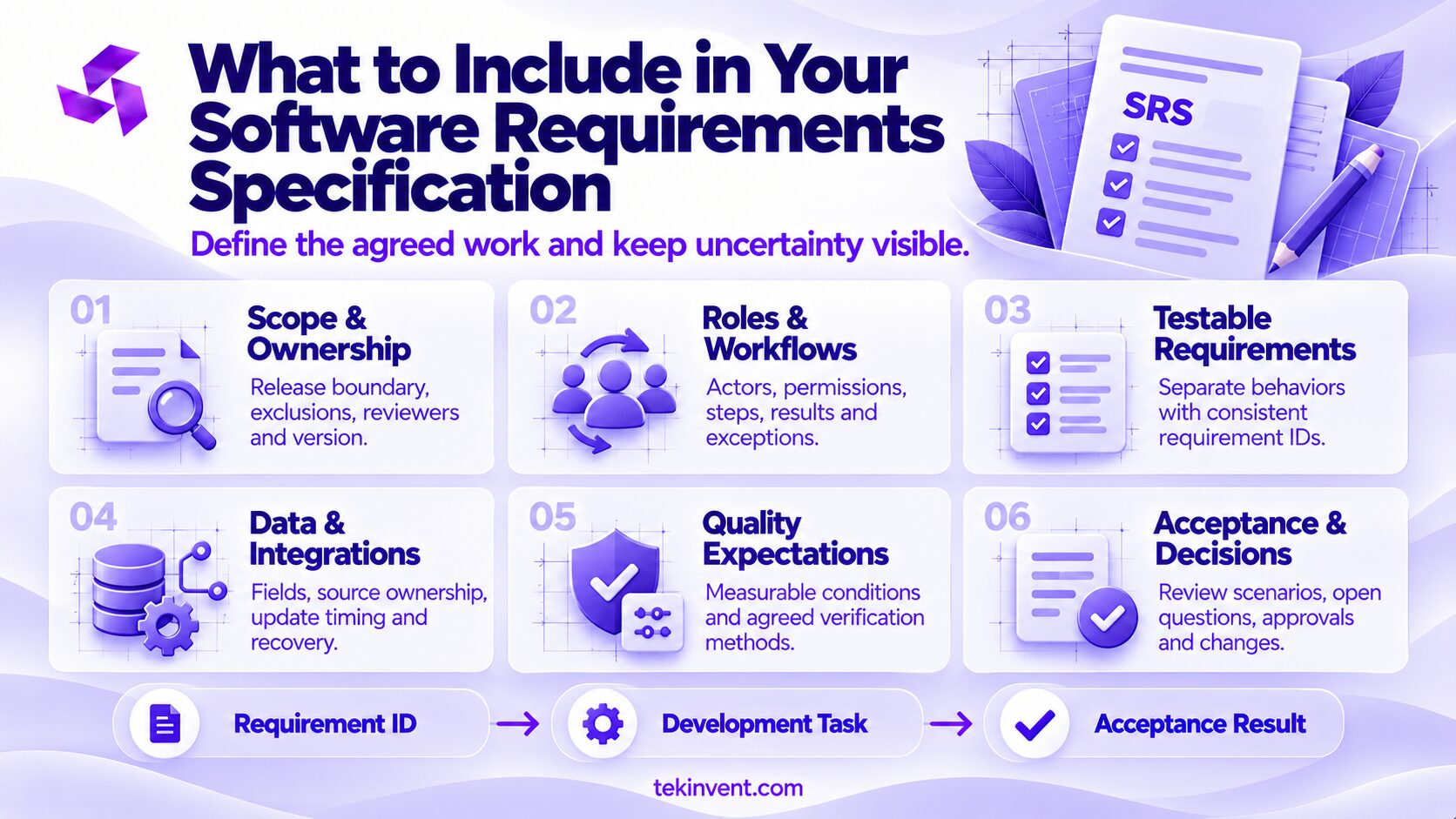
Include the release boundary, user roles, required behavior, data, integrations, quality expectations, and acceptance evidence. Record assumptions and unresolved questions separately so nobody treats a guess as an approved requirement.
The document should explain the result rather than unnecessarily prescribe the implementation. “Customers can download their invoices” describes a need. Naming a particular database does not explain that behavior, although an existing infrastructure constraint may justify including a technology requirement elsewhere.
An SRS can coexist with diagrams, designs, and a task backlog. Use links or identifiers to connect them. Avoid copying the same requirement into several places that may drift apart.
The first version does not have to settle every future feature. It must distinguish approved first-release requirements from ideas that remain under consideration.
A copyable software requirements specification template
Replace bracketed fields with your project information. Use the same requirement IDs in review comments, development tasks, and test results.
1. Document control
- Project: [Project name]
- Release covered: [Release or milestone]
- Version and review date: [Version, date]
- Business owner: [Person authorized to approve scope]
- Technical reviewer: [Person responsible for feasibility review]
- Acceptance reviewer: [Person responsible for business verification]
- Status: [Draft, under review, or approved]
Maintain a short change history stating what changed and who approved it. A version number is useful only when reviewers can identify the decisions behind it.
2. Business purpose and release boundary
Problem: [Describe the current workflow and its limitation.]
Intended outcome: [State what people should be able to accomplish.]
Included: [List the workflows covered in this release.]
Excluded: [List nearby functions that are deliberately outside scope.]
Success review: [Explain how the business will evaluate the release after use.]
A success measure is distinct from a contractual acceptance test. Staff may hope to reduce processing time after launch, while acceptance verifies that a correctly submitted order reaches the operations queue.
3. Users, roles, and permissions
| Role | Allowed actions | Explicit restrictions |
|---|---|---|
| [Customer] | [Submit and view own requests] | [Cannot view other customers’ records] |
| [Operations employee] | [Review and assign requests] | [Cannot change account permissions] |
| [Administrator] | [Manage authorized access] | [Restrictions on sensitive actions] |
Specify the ownership of records and any delegated access. “Staff can manage orders” is incomplete if only some employees should approve cancellations.
4. Main workflows and exceptions
For each workflow, complete this record:
- Workflow ID and name: [WF-001, name]
- Actor: [Who starts the action]
- Starting conditions: [What must already be true]
- Trigger: [What begins the workflow]
- Expected sequence: [Actions and system responses]
- Successful result: [What is stored, displayed, or sent]
- Exceptions: [Failure, cancellation, conflict, or unavailable service]
- Related requirement IDs: [FR-001, FR-002]
A diagram can supplement the record, especially when several roles participate. Keep the written exceptions even if the diagram mainly shows the successful path.
5. Functional requirements
| Field | Information to provide |
|---|---|
| ID | [Unique identifier] |
| Required behavior | [One clear obligation] |
| Conditions | [When the obligation applies] |
| Business rule | [Relevant limit, calculation, or approval rule] |
| Priority | [Needed for launch or deferred] |
| Acceptance evidence | [Scenario and expected result] |
| Owner | [Person who can clarify the requirement] |
Separate independently testable behavior into separate requirements. A sentence containing account creation, payment, and email confirmation is usually too broad for useful review.
6. Data and integrations
Document each record type, required fields, validation, ownership, and access restrictions. Explain what happens to existing data if the project replaces a current tool.
For each integration, include:
- Connected system and responsible contact.
- Information sent and received.
- Authoritative source for shared fields.
- Required update timing.
- Test access and known limitations.
- Behavior during failure or delayed updates.
- Reconciliation and recovery responsibility.
An interface diagram alone will not resolve conflicting records or repeated messages. Those are behavior requirements that need explicit decisions.
7. Quality and operating requirements
Describe performance, availability, accessibility, security, supported environments, and recovery expectations where they matter to the product.
Use measurable conditions when possible, including the test environment and representative workload. Avoid declaring that every page must be “instant” without defining what is being measured.
Record deployment restrictions, service hours, monitoring ownership, and support contacts. If the business needs a maintenance window, explain when it can occur and how staff will be notified.
8. Acceptance, open questions, and approvals
Acceptance plan: [Who reviews each workflow, what environment is used, and which defects prevent release.]
Open question log: [Question, owner, decision date, affected requirements.]
Dependencies: [External access, content, data preparation, approvals.]
Scope approval: [Authorized reviewers and approved version.]
Approval should identify the document version. A general email saying “looks good” may not establish which changes the reviewer actually saw.
Turn Your Workflow Into Reviewable Requirements
Share your business process and unresolved scope questions with TekInvent.
Worked example: a service request portal
Consider a hypothetical US equipment-service business replacing emailed repair requests. Customers need to submit requests and see their status. Operations employees need to review and assign them.
The first release excludes payments, automated technician routing, and customer chat. Those exclusions help keep the portal’s purpose distinct from a larger service-management system.
Describe a requirement with observable behavior
A useful functional requirement could read:
FR-014: When an authenticated customer submits a valid service request, the system must create one request record and display its reference number.
The related validation requirement should define a valid request. For this example, it could require equipment ID, service address, and a description of the problem. Optional attachments deserve their own limits and failure behavior.
The acceptance scenario can be specific: submit a request with valid required fields, confirm that one record exists, and verify that the displayed reference matches the operations queue.
A repeat click introduces an exception. If the customer presses Submit twice before receiving confirmation, should the system create another request? Record the intended behavior and test it separately.
Define permissions using negative cases
“Customers can view requests” leaves record access ambiguous. A clearer requirement limits access to requests belonging to the customer’s authorized account.
Acceptance should include an attempt to open another account’s request. Verify that the system denies the unauthorized request even if the person attempts access outside the normal interface.
The business also needs to decide whether several employees of one customer organization can share request visibility. That choice affects account structure and cannot be left to interface design alone.
Replace vague quality language with agreed test conditions
A requirement such as “the portal should load quickly” is difficult to verify. A useful version specifies the action, threshold, dataset, workload, and measurement.
For illustration, the team might propose that the request list appear within three seconds in at least 95% of test runs, using an agreed network profile and 5,000 sample records. These numbers are hypothetical acceptance inputs, not universal performance recommendations.
Feasibility review may change those inputs. The business should consider which delays affect real work and whether the target justifies its cost.
Accessibility requirements need similar precision. Specify the agreed criteria and verification method rather than simply labeling the product accessible. A development team and accessibility reviewer can help determine the appropriate scope.
Expose integration assumptions before estimation
Suppose the portal sends requests to existing scheduling software. The SRS should say what happens if that software is unavailable.
One possible business decision is to store the request in the portal, show it as awaiting transfer, and notify operations if the transfer remains unsuccessful beyond an agreed interval. Another is to prevent submission until the connection recovers.
These choices create different customer experiences and development work. Neither should be selected silently by the vendor.
During planning, use available documentation and test access to verify the integration. Until then, label its feasibility and effort as unresolved. A requirement document can describe desired behavior without pretending that the connection has already been proven.
TekInvent’s custom software development timeline guide provides additional context for dependencies that can affect the delivery schedule.
Use the SRS to compare estimates and manage changes
Give vendors the same approved scope and ask them to identify assumptions and exclusions. That produces a more useful comparison than sending only a list of screen names.
When a proposed feature changes, update the requirement and examine its connected workflows. Adding organization-wide request visibility may affect permissions, notifications, reporting, and acceptance tests.
The change record should state the reason, affected IDs, estimated cost and timing effects, and approval. A backlog task can reference that decision instead of becoming an undocumented scope change.
For a project discussion with a custom software development company, bring the current SRS version and open-question log together. The unresolved items are part of the estimate conversation.
Keep requirements usable during delivery
A document loses value if approved behavior changes in meetings while the written version remains untouched. Assign responsibility for updates and review changes at milestone boundaries.
Traceability can be simple. A small table connecting requirement IDs to development tasks and acceptance results may be enough for a modest project. Use the level of detail that supports decisions without creating unnecessary administration.
Mark deferred and removed requirements clearly. Deleting them without explanation can hide the reason a feature was excluded and cause the same debate later.
The software development cost guide can help connect scope decisions to the workstreams in a project estimate. The SRS remains the place to state your actual required behavior.
Review the document with the people who use the workflow
Before approval, have operational staff walk through the main scenarios, including mistakes and interrupted work. They may identify a missing step that a sponsor or developer cannot see from the brief.
Technical reviewers should flag uncertain integrations and unrealistic constraints. Testers should confirm that acceptance conditions produce a clear pass or fail result.
The final review should leave each open issue with an owner and a decision path. A useful software requirements specification makes the agreed work explicit and keeps uncertainty visible. That gives business owners a practical basis for estimates, milestone reviews, and decisions about what to build next.

Build Smart with The Right Team.
We bring expertise, technology, and trust you look for in your digital journey.