
Progressive web app development cost depends on the web product you need, the experience it must provide, and how much app-like behavior is worth building. A PWA can give users a web experience that may be installable and can support selected offline tasks. It is not automatically cheaper than a website or a native app: the cost comes from the workflows, integrations, data handling, testing, and ongoing support in scope.
Start with the user’s task. If customers need to browse information and submit a basic form, a responsive website may be enough. If repeat users need a launchable app icon, a cached interface, or a workflow that continues during intermittent connectivity, PWA capabilities may be useful. If the product depends on device features or platform behavior that the web cannot reliably support for your audience, a native app may be a better fit.
What a PWA includes
A progressive web app is built with web technologies and can be used through a browser. Depending on its implementation and the user’s browser and device, it may also be installable and provide app-like behavior. A web app manifest describes how the app should appear and launch. Service workers can support offline behavior by managing requests and cached resources, but offline access must be designed around the specific task.
These capabilities are not a single feature switch. The product team decides what to cache, what can happen without a network, how updates are handled, and which devices and browsers to support. Installation behavior also varies by browser and platform, so do not promise that every user will see the same install prompt or experience.
When a PWA makes sense
A PWA may fit when users benefit from a linkable web product and app-like access without requiring every workflow to depend on native platform capabilities. It can be a useful option for a customer portal, field reference tool, event schedule, or repeat-use service where some content can remain available during a connection interruption.
The fit depends on what offline means for the business. A read-only catalog may be able to show recently viewed information from a cache. A service request may let the user draft a form and submit it after connectivity returns, if the product clearly communicates the status. A payment or safety-critical action may need to wait for a reliable connection and confirmation from the server.
Signs a PWA could be a good fit
- Users already reach the product through a web link.
- The main tasks work well in a browser-based interface.
- Installability could make repeat access more convenient.
- Some information or actions can be made useful during a connection loss.
- Search and sharing through URLs matter to the product journey.
- The business can support the browser and device combinations its users rely on.
Signs to evaluate other options
A PWA may be a poor fit if the app depends heavily on a device API that is unavailable or inconsistent across target browsers, requires extensive background processing, or must meet platform-specific expectations that the web implementation cannot satisfy. It can also be a weak choice when the business needs app-store discovery as its main acquisition channel and has not checked how distribution will work for its target users.
Do not choose a PWA because someone assumes it avoids mobile development. Compare it with a responsive website, a native app, and a cross-platform app using the same user journeys. The right answer may be a website first, a PWA for selected workflows, or a separate native app for a specific capability.
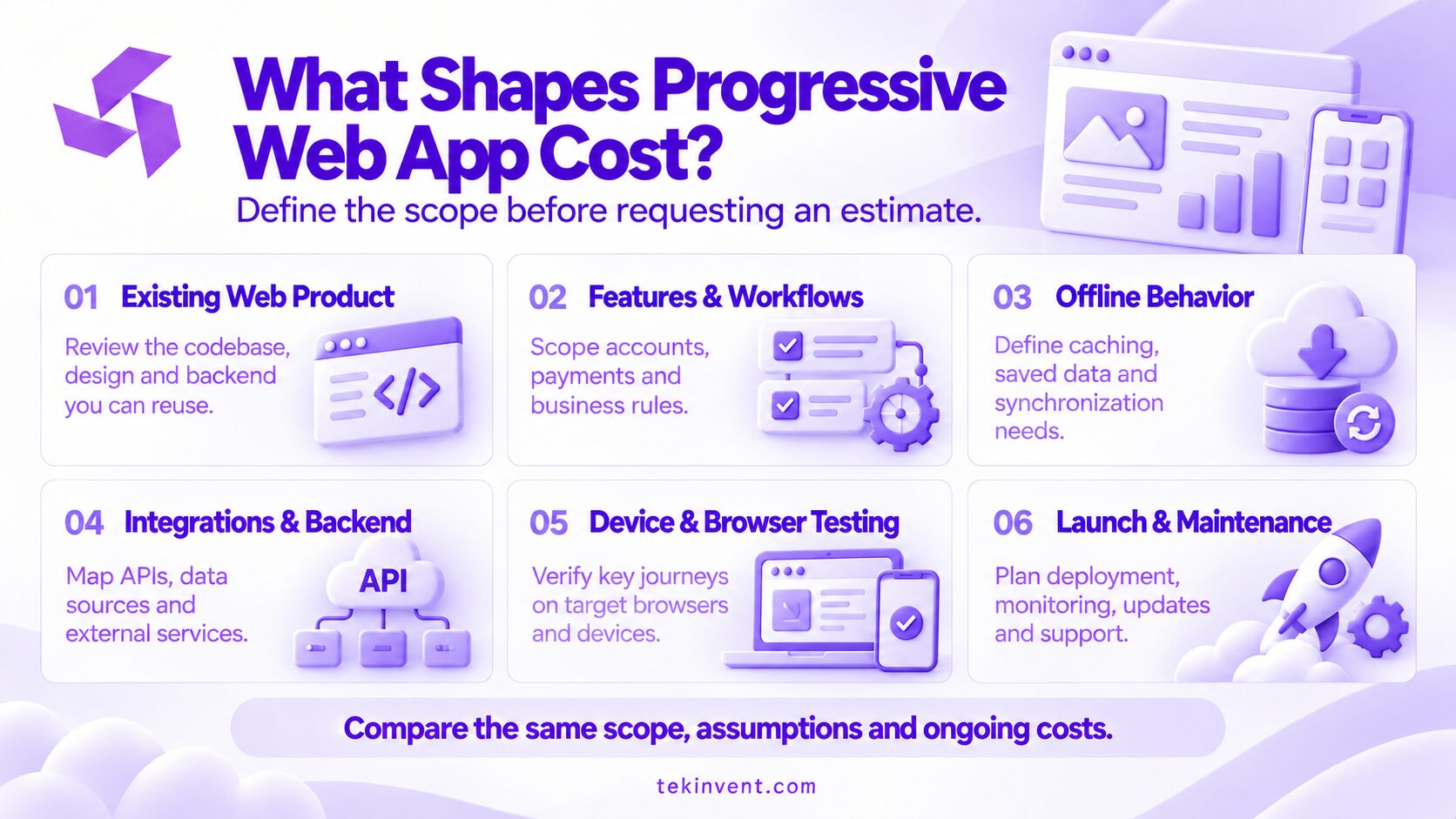
The main factors that affect PWA development cost
Product scope and user journeys
The number and complexity of user journeys shape design, engineering, and testing. A simple account area has different needs from a multi-role portal with approvals, saved items, payments, notifications, and reporting. A feature list should explain why each capability belongs in the release and which user outcome it supports.
Map the successful path and the exceptions. If a user can create a request offline, what happens when the same record is edited elsewhere before synchronization? If the product stores a draft, how does the user know whether it has reached the server? These states affect interfaces, data rules, and quality assurance.
Offline support and caching
Offline behavior can range from showing a helpful offline page to supporting specific tasks with locally stored information. The more a user can do without a connection, the more decisions the product needs about data freshness, conflict resolution, storage limits, privacy, and synchronization.
Caching every page or record is rarely a safe default. Choose the content that users need and can access appropriately. Define how old data may be, how users can tell they are offline, and what actions must wait for server confirmation. Sensitive data may need stricter local storage rules than public content.
Installation and app-like behavior
A manifest supplies information such as the app’s name, icons, and launch behavior. Development work includes preparing and validating these assets, linking the manifest, and checking installation behavior on target combinations. Supporting browsers do not all handle installation the same way, so the experience should remain usable as a normal website too.
The installable experience should solve a user need. An installation prompt shown before users understand the product can interrupt the main task. Consider where an install option helps repeat users and how it should be explained.
Design, accessibility, and responsive behavior
A PWA needs an interface that works across screen sizes, input methods, and display modes. Design work includes navigation, loading states, forms, error messages, and the transition between online and offline use. Accessibility needs such as keyboard support, readable contrast, labels, and clear focus behavior should be considered during design and testing.
If the existing website already has a design system, components may be reusable. The team still needs to check that the interface works in an installed window and handles browser differences. Reusing a component without verifying its behavior can move cost into later fixes.
Integrations and backend services
Connections to payments, customer records, inventory, maps, identity services, or analytics add planning and testing. Confirm that systems have usable interfaces and that the people who own them can provide access. Include failure behavior: a disconnected service, expired authentication, incomplete data, or duplicate submissions.
The backend may need changes to support synchronization or account continuity across devices. Estimate that work separately from the visual interface so the team can explain what drives effort and where the uncertainties remain.
Security, privacy, and data retention
Security requirements depend on what the PWA stores and how users access it. Decide what information belongs on the device, which role can see each record, and how cached data is removed when a user signs out. Avoid keeping sensitive information locally without a clear product need and appropriate review.
If the product handles regulated or sensitive data, confirm applicable obligations with qualified legal and security professionals. Requirements vary by use case. Build confirmed safeguards into the scope and test plan rather than treating them as a generic final check.
Testing and ongoing maintenance
Testing must cover the browsers, operating systems, and devices that matter to the audience. Include installation, updates, intermittent connections, cached content, permissions, and the return to normal online use. Since browser capabilities evolve, plan for ongoing compatibility review and maintenance after launch.
Account for deployment, monitoring, backups where appropriate, defect handling, and credential ownership. Ask who reviews browser changes and responds when a capability behaves differently after an update.
How to estimate the work without relying on generic prices
There is no single price that describes every PWA. Prepare a brief with the core users, workflows, target devices, integration list, offline expectations, data types, and launch requirements. Ask providers to estimate the same scope and identify assumptions, exclusions, and dependencies.
Use a simple worksheet to clarify scope:
| Cost area | Questions to resolve |
| Product planning | Which user problem and release goal are in scope? |
| Interface design | Which journeys, states, and accessibility needs must be designed? |
| Web application | What pages, roles, and business rules are required? |
| PWA behavior | Which install, caching, and offline capabilities are actually needed? |
| Integrations | Which outside systems and data connections are required? |
| Quality assurance | Which browsers, devices, and failure cases will be tested? |
| Launch and support | Who handles deployment, monitoring, maintenance, and user issues? |
Ask the provider to separate the initial release from optional improvements. If offline synchronization is uncertain, request a technical investigation that ends with a recommendation and updated scope. This makes planning more useful than hiding a major unknown inside an estimate.
For a business deciding whether to build or improve a web application, a web app development company can help review the product requirements and implementation options.
Estimate the PWA Your Users Actually Need
TekInvent can help turn your web product requirements into a clear development scope.
Common cost-planning mistakes
Assuming “progressive” means a small add-on
Adding a manifest is only part of an installable experience. Offline access, synchronization, account state, responsive design, integration behavior, and testing may require meaningful product work. Estimate the specific capabilities users need rather than using the PWA label as a scope description.
Building offline mode without a user task
Offline support can add complexity. If users do not need to complete work without a connection, caching and synchronization may not justify that effort. If they do, define the tasks and information that need to remain available and what the app should do when they reconnect.
Ignoring browser and device variation
Assuming a single installation flow can create confusion for users on other platforms. Test supported combinations and provide clear guidance where the behavior differs. The underlying website should continue to work for people who do not install it.
Treating the app like a one-time build
Browsers, devices, dependencies, and business workflows change. Plan for maintenance and assign responsibility for monitoring issues. A cost estimate that ends at launch misses the work needed to keep the service dependable.
A practical decision process
- Define the main user task and where people will access it.
- Check whether a responsive website already serves the task.
- Identify the specific app-like capability that would improve the experience.
- Decide which parts must work offline, if any.
- Confirm browser and device requirements with representative users.
- Review data, integration, privacy, and security needs.
- Compare the PWA scope with a native or cross-platform alternative.
- Estimate launch and maintenance responsibilities along with development.
If the PWA option meets user needs with a supportable scope, plan the smallest release that can test those needs. If a required capability does not work reliably for the audience, change the platform decision before the team commits to the full build.
Plan the product, not just the technology
The useful question is not whether a PWA costs less in general. It is whether the capabilities it needs fit the product and what work is required to deliver them well. A narrow web experience with installation may be straightforward; an offline-first service with synchronization and sensitive records needs more detailed design and testing.
Make the cost decision from workflows, platform requirements, integrations, data, and support. When the estimate explains those pieces, you can compare development options and choose a release that solves a real user problem without paying for capabilities the product does not need.

Build Smart with The Right Team.
We bring expertise, technology, and trust you look for in your digital journey.