
Choosing a game engine is one of the most important technical decisions you will make before full development begins.
Two names usually dominate that conversation: Unity and Unreal Engine.
Both engines can create professional commercial games, support major platforms, provide powerful development tools, and handle ambitious projects. However, their workflows, programming environments, rendering capabilities, licensing models, and common use cases differ.
So which one should you choose?
The answer to Unity vs Unreal Engine depends less on which engine is universally “better” and more on what you are trying to build.
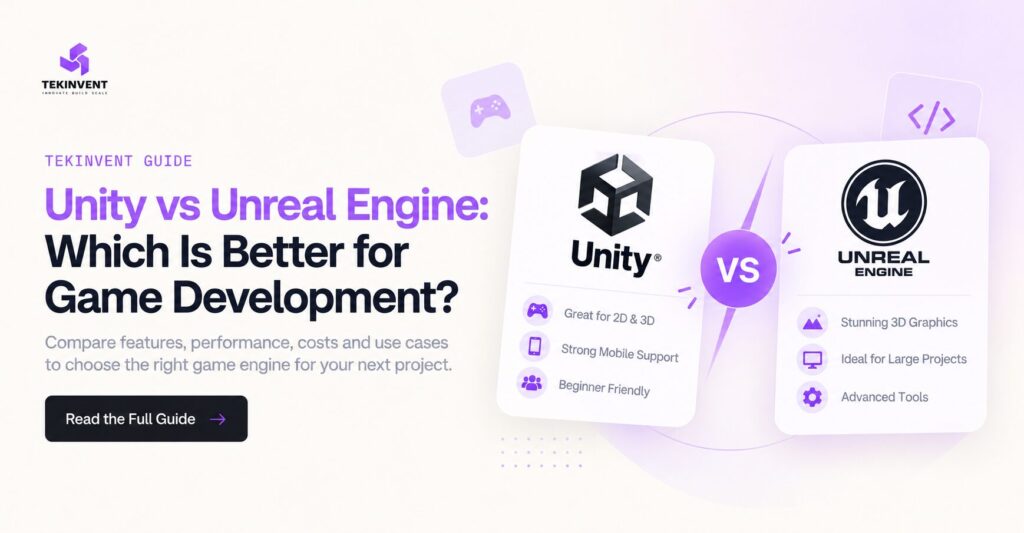
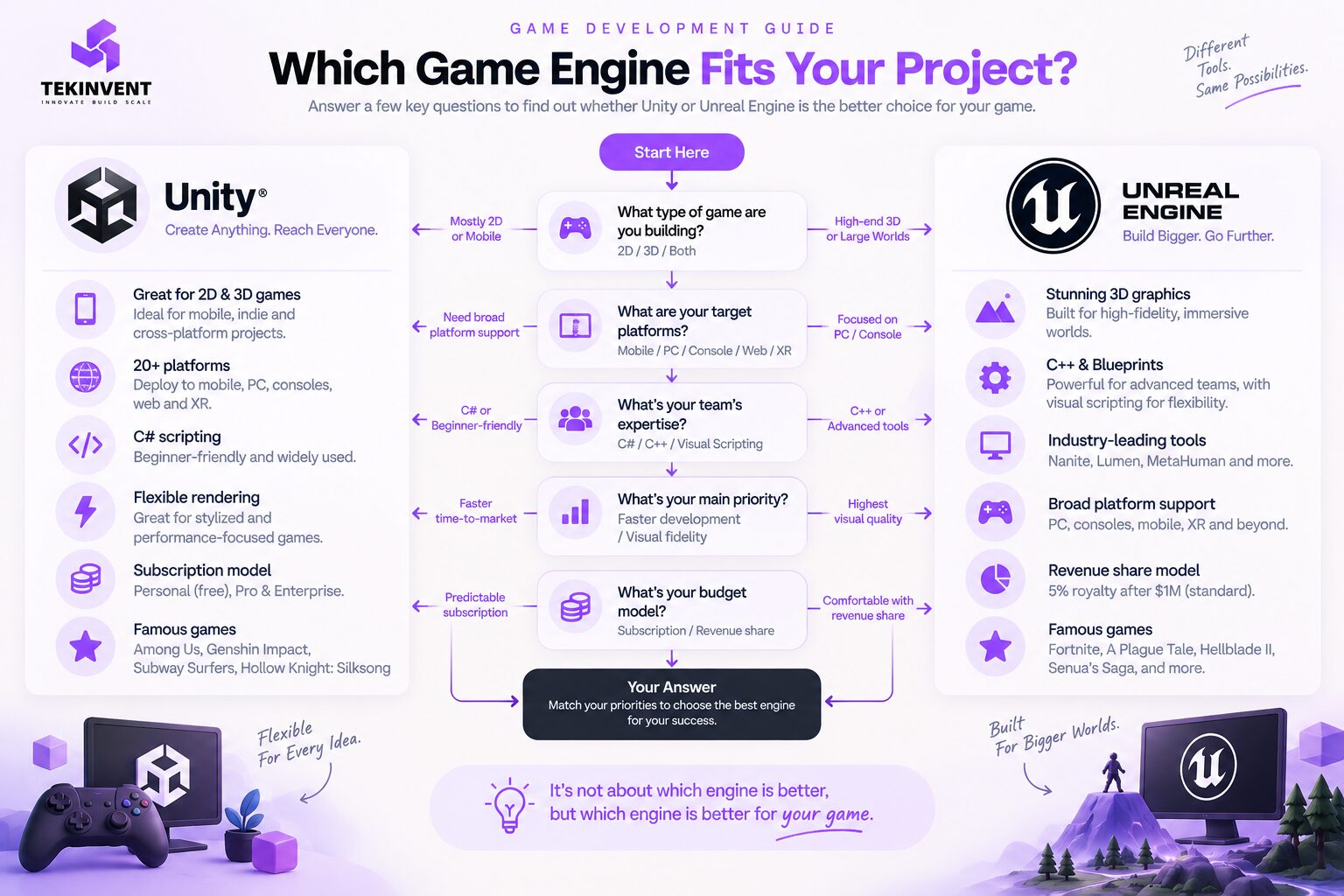
Unity can be particularly attractive for mobile games, 2D projects, cross-platform development, stylized 3D games, and teams already comfortable with C#. Unity officially supports development across more than 20 end-user platforms. Unity
Unreal Engine becomes especially compelling when a project requires high-end real-time 3D rendering, sophisticated environments, advanced lighting, large worlds, or workflows built around tools such as Nanite, MetaHuman, and Unreal’s broader real-time ecosystem. Unreal Engine 5.7 continues that direction with improvements aimed at expansive, high-fidelity worlds, animation, materials, procedural content, and MetaHuman integration. Unreal Engine
The right decision should therefore begin with the game, team, platforms, and production requirements.
What Is Unity?
Unity is a real-time development engine used for creating 2D and 3D games and interactive applications.
One of its biggest strengths is flexibility.
Unity says its engine can deploy projects across more than 20 platforms, and its current game platform coverage includes desktop, iOS, Android, major consoles, Meta Quest, web, and Apple Vision Pro, among others. Unity
Unity uses C# as its primary scripting language, which is one reason many developers find it approachable when moving into professional game programming.
Its ecosystem also covers 2D development, 3D rendering, physics, animation, UI, multiplayer workflows, XR, asset management, and a large collection of third-party tools and assets.
Unity is not exclusively a mobile or indie engine.
Projects showcased by Unity include Genshin Impact, Subway Surfers, Beat Saber, DREDGE, Sons of the Forest, Cult of the Lamb, and Hollow Knight: Silksong. Unity
That variety demonstrates an important point: Unity’s usefulness is not limited to one game genre or visual style.
What Is Unreal Engine?
Unreal Engine is Epic Games’ real-time development engine.
It is particularly well known for sophisticated 3D rendering and tools designed to create detailed interactive environments.
The current Unreal Engine 5.7 release continues to expand areas such as Nanite, procedural content generation, materials, animation, MetaHuman integration, lighting, and large-scale environment creation. Epic describes the release as focused on building expansive, lifelike worlds with high visual fidelity on current-generation hardware. Unreal Engine
Unreal also combines traditional programming with Blueprint visual scripting.
That means teams can create and test gameplay logic visually while still using C++ where deeper programming control or performance-oriented implementation is required.
Like Unity, Unreal is much broader than one type of game.
It can be used for PC, console, mobile, XR, and other real-time experiences.
Unity vs Unreal Engine: What Is the Main Difference?
The biggest practical difference is not simply graphics.
It is workflow and project fit.
Unity has traditionally offered a flexible development environment suitable for a wide range of 2D, mobile, indie, XR, and cross-platform projects.
Unreal places significant emphasis on sophisticated 3D production, rendering, large environments, cinematic workflows, and advanced real-time visuals.
But these are tendencies, not hard limitations.
Unity can create visually sophisticated 3D games.
Unreal can create smaller projects.
Choosing an engine solely because someone says “Unity is for mobile” or “Unreal is for AAA games” oversimplifies the decision.
Your team needs to consider the complete production pipeline.
Unity vs Unreal Engine for Graphics
Graphics is probably the area where Unreal Engine receives the most attention.
Unreal Engine 5 introduced technologies such as Nanite and Lumen, and Epic continues to expand its high-fidelity rendering capabilities. Unreal Engine 5.7 adds further improvements for dense environments, physically accurate layered materials, lighting, animation, and large-scale content. Unreal Engine
This can make Unreal particularly attractive for games where visual realism is central to the product.
Imagine an architectural-quality environment, realistic racing experience, detailed action game, or large 3D world where lighting and environmental detail contribute directly to immersion.
Unreal provides a strong starting point for these use cases.
Unity also provides sophisticated rendering capabilities.
Unity 6 includes improvements across rendering, lighting, visual effects, performance, adaptive performance, and related systems. Unity also provides different rendering approaches so developers can choose based on platform and graphical requirements. Unity Documentation
The real question is whether your project actually requires the highest possible graphical fidelity.
A casual mobile game does not automatically become better because it has photorealistic lighting.
Visual technology should support gameplay rather than unnecessarily increasing production complexity.
Unity vs Unreal Engine for 2D Games
For dedicated 2D development, Unity has a particularly established workflow.
Unity’s official documentation states that the engine is suited to both 2D and 3D projects. Its 2D environment includes workflows for sprites and other 2D-specific production requirements. Unity Documentation
That makes Unity a practical option for platformers, puzzle games, card games, side-scrollers, casual mobile titles, and other sprite-based projects.
Unreal Engine can technically be used for projects with two-dimensional gameplay, but teams should ask whether its broader 3D-oriented toolset provides meaningful value for the project.
If your project is primarily a dedicated 2D experience, engine choice should consider how quickly the team can create levels, animation, interfaces, effects, and gameplay rather than which engine has the most advanced 3D renderer.
This connects directly with the broader 2D vs 3D game development decision. Decide how the game should play first, then choose the engine that supports that production pipeline efficiently.
Unity vs Unreal Engine for 3D Games
Both engines are capable 3D development platforms.
Unity’s 3D workflow includes meshes, environments, terrain, lighting, visual effects, character animation, user interfaces, multiple render pipelines, and support for a broad range of target platforms. Unity Documentation
Unreal’s strength becomes especially visible when the project requires sophisticated visual environments.
Its modern toolset is designed around large amounts of geometric detail, high-quality lighting, procedural environment creation, animation, and real-time rendering.
For a stylized 3D mobile game, Unity may provide everything the team requires while supporting efficient cross-platform deployment.
For a visually ambitious PC or console project built around realistic environments, Unreal may provide tools that align particularly well with the project’s requirements.
The decision is about the production target, not simply whether the game is 3D.
Programming: C# vs C++
Programming language is another major difference.
Unity primarily uses C# scripting.
C# is widely considered relatively approachable for developers learning object-oriented programming while still being powerful enough for professional production.
Unreal Engine is closely associated with C++.
C++ provides substantial control but can have a steeper learning curve, particularly for developers without experience in lower-level programming concepts.
However, Unreal has another important tool: Blueprints.
Blueprints allow developers and designers to create gameplay logic through a visual node-based system.
This can help designers prototype interactions without writing every gameplay system directly in C++.
For teams, the decision should therefore consider existing expertise.
A team already experienced in C# may become productive in Unity faster.
A team with strong C++ experience may be comfortable with Unreal’s programming environment.
Changing engines can mean changing not only software but also development practices.
Which Engine Is Better for Beginners?
There is no universal answer, but Unity is often approachable for developers who want to learn game programming with C# and begin with smaller 2D, mobile, or straightforward 3D projects.
Unity also provides official learning resources aimed at new users.
Unreal can also be accessible to beginners because Blueprints allow developers to experiment with gameplay logic visually.
The difference is what the beginner wants to learn.
Someone interested in building a small mobile game may find Unity’s workflow appropriate.
Someone primarily interested in sophisticated 3D environments may prefer beginning directly with Unreal despite the additional complexity.
Learning the engine that matches the project can be more useful than learning the supposedly easiest engine.
Unity vs Unreal Engine for Mobile Games
Mobile development is one area where Unity has extensive cross-platform coverage.
Unity officially supports Android and iOS alongside many other deployment targets, and Unity 6 includes optimizations for mobile and web-oriented builds. Unity
This can make it attractive for mobile-first studios that need to support many device configurations.
Unreal can also build mobile games.
However, teams creating highly detailed Unreal projects need to be careful not to design the game around desktop or console visual expectations and then assume the same rendering workload will transfer directly to lower-powered devices.
The correct engine choice depends on what the mobile game needs.
A casual puzzle game and a visually sophisticated mobile action game have completely different technical requirements even though both target smartphones.
Performance Depends on the Game, Not Just the Engine
It is tempting to ask which engine has better performance.
That question is incomplete.
Performance depends on rendering choices, code quality, asset complexity, physics, AI, shaders, lighting, memory usage, target hardware, and optimization.
An optimized Unreal project can perform extremely well.
An optimized Unity project can perform extremely well.
A poorly optimized project in either engine can struggle.
Engine choice should therefore consider what performance characteristics matter.
For a mobile game, battery usage, memory, thermal behavior, download size, and frame rate may be critical.
For a high-end PC title, graphical fidelity and GPU utilization may receive greater priority.
Performance targets should be established before full production.
Which Engine Is Better for Cross-Platform Development?
Unity has a strong cross-platform proposition.
Unity currently states that its engine supports more than 20 end-user platforms, while its game-development offering lists desktop, mobile, console, web, XR, and other deployment targets. Unity
That can be valuable for businesses planning a game across Android, iOS, PC, consoles, or XR.
However, “build once and publish everywhere” should never be interpreted literally.
Different platforms have different hardware, controls, screen sizes, performance characteristics, store requirements, and certification processes.
Even when the engine supports multiple platforms, developers still need platform-specific testing and optimization.
Unreal also supports major gaming platforms, including consoles, and Epic states there is no separate engine fee for console use, although developers need approval from the relevant platform holder to access console SDKs. Unreal Engine
Your launch strategy should therefore influence engine selection from the beginning.
Unity vs Unreal Engine Pricing
Pricing deserves careful attention because outdated information still appears online.
For Unity, one important update is that the proposed Runtime Fee was canceled. Unity states that no games made with Unity 6 or other Unity versions are subject to that Runtime Fee. Unity
Unity offers Personal, Pro, and Enterprise options, with eligibility and pricing depending on the plan and organization. Unity also announced a 5% price increase for Pro and Enterprise subscriptions beginning January 12, 2026. Unity
Unreal Engine uses a different model for games.
Under Epic’s standard license, a royalty-bearing game generally pays a 5% royalty on worldwide gross revenue above the first $1 million in lifetime gross revenue per product. Epic also offers a reduced 3.5% royalty under its qualifying Launch Everywhere with Epic program. Unreal Engine
This difference matters.
Unity’s commercial costs can involve subscription plans, while Unreal’s standard game licensing can introduce royalties after a successful game crosses the applicable threshold.
Teams should model these costs against expected revenue rather than choosing based only on the fact that an engine can initially be downloaded without a large upfront fee.
Asset Ecosystems Can Save Development Time
Both engines have ecosystems that can reduce the need to build everything from scratch.
Developers may find environments, character systems, shaders, animations, sound effects, UI components, plugins, and development tools.
Unreal developers have access to Epic’s Fab marketplace, which provides 3D models, materials, sound, visual effects, digital humans, and other content. Unreal Engine
Unity also has a large ecosystem of reusable assets and development tools.
This can significantly affect project economics.
If a reliable existing system solves a non-differentiating requirement, purchasing or adapting it may be more efficient than spending weeks recreating the same functionality.
However, third-party assets should still be reviewed for performance, licensing, maintenance, compatibility, and code quality.
Which Is Better for Indie Developers?
The answer depends on the indie game.
For a small team building a 2D game, mobile title, stylized 3D game, or multiplatform project, Unity can be an attractive option because of its C# workflow, broad platform support, and flexibility.
For an indie team developing a highly visual 3D title, Unreal can also be an excellent choice.
Modern development tools have made sophisticated 3D production increasingly accessible to smaller teams.
The biggest risk for indie developers is often not choosing the “wrong” engine.
It is choosing a project scope the team cannot finish.
The engine should reduce production friction rather than encourage unnecessary features.
This is why the engine decision should happen alongside a realistic game development timeline, particularly before the team commits to large-scale asset production.
Which Is Better for Large and AAA Games?
Unreal Engine has a particularly strong position in high-end 3D production.
Its focus on high-fidelity rendering, large environments, advanced animation, procedural content, and tools such as MetaHuman can align well with ambitious projects. Unreal Engine 5.7 continues investing heavily in those areas. Unreal Engine
That does not mean Unity cannot support large commercial projects.
Unity’s own current showcase includes major games across different genres and platforms. Unity
Large studios also evaluate factors that smaller developers may not prioritize, including custom engine modifications, pipeline integration, build infrastructure, source control, technical art workflows, console deployment, specialized rendering, and long-term support.
At that scale, engine selection becomes an engineering and production decision rather than a simple feature comparison.
Which Engine Is Better for Multiplayer?
Both can support multiplayer development.
The more important questions involve architecture.
Will the game be peer-to-peer or server authoritative?
How many simultaneous players are required?
Does it need matchmaking?
Will players have persistent accounts?
Does the game require cross-platform play?
How will cheating be managed?
How frequently does gameplay state need to be synchronized?
Epic also provides Epic Online Services for functionality such as friends, matchmaking, lobbies, achievements, leaderboards, and accounts across multiple platforms. Unreal Engine
Unity has likewise continued investing in multiplayer tooling within Unity 6. Unity Documentation
The engine can provide infrastructure and tools, but it cannot remove the architectural complexity of multiplayer game development.
Consider Your Existing Team Before Choosing
Technology decisions should not ignore people.
Imagine that your developers have spent five years building games with Unity and C#.
Switching to Unreal because a new graphical feature looks impressive can introduce training time, workflow changes, tooling changes, and production risk.
The reverse is also true.
A team experienced with Unreal, C++, Blueprints, and Unreal’s art pipeline may lose productivity if forced into another environment without a strong reason.
Businesses should therefore evaluate engine capability together with team capability.
The best theoretical engine may not be the best production choice if the team cannot use it effectively.
Prototype Before Committing to Full Production
One of the safest approaches is to test the riskiest parts of the game before choosing a long-term production pipeline.
Build a small prototype.
Test the core mechanic.
Create one representative environment.
Try the intended art style.
Measure performance on the target device.
Test any critical multiplayer requirement.
Estimate how quickly the team can produce content.
If visual fidelity is central to the project, compare representative scenes rather than online screenshots from unrelated games.
A prototype can reveal whether an engine fits your actual project much more reliably than a generic feature comparison.
Can You Change Engines Later?
Technically, yes.
Practically, it can be extremely expensive.
Game logic written for one engine may need to be rewritten.
Shaders can require rebuilding.
Materials may behave differently.
Physics systems can change.
Animation pipelines may need adjustment.
Third-party plugins may not have equivalents.
Levels and tools may need substantial rework.
Changing engines during early prototyping may be manageable.
Changing engines deep into production can affect the entire game development timeline and create months of additional work.
This is why engine evaluation should happen before the project accumulates large amounts of engine-specific code and content.
When Unity May Be the Better Fit
Unity deserves serious consideration when the project requires broad cross-platform deployment, strong 2D support, mobile development, C# scripting, XR development, or a flexible engine suitable for different visual styles.
It can also make sense when the existing development team already has strong Unity expertise.
Unity’s support for more than 20 end-user platforms reinforces its position for teams where deployment flexibility is a major requirement. Unity
The engine should still be tested against the actual game’s performance and production requirements.
When Unreal Engine May Be the Better Fit
Unreal deserves serious consideration when the project depends heavily on sophisticated real-time 3D visuals, large environments, high-end lighting, complex character pipelines, or workflows that benefit from Unreal’s current rendering and content-creation technologies.
It can also fit teams that want to combine C++ development with Blueprint visual scripting.
The continuing improvements in Unreal Engine 5.7 around large-scale environments, materials, lighting, animation, procedural generation, and MetaHuman workflows reinforce that positioning. Unreal Engine
Again, this does not mean every 3D project should use Unreal.
A technically simpler engine choice can be better if it gets the game to players faster and meets all visual requirements.
How Should a Business Choose Between Unity and Unreal?
Start with the game design rather than the engine.
Define whether the game is 2D, 2.5D, or 3D.
Identify the target platforms.
Define the visual quality required.
Determine whether multiplayer is necessary.
Estimate the amount of content.
Understand the target hardware.
Review your team’s programming and art experience.
Then consider licensing, third-party tools, required integrations, long-term maintenance, and expected revenue.
Only after these questions are answered should you compare engines.
A professional game development company can also prototype critical systems in the appropriate engine before full production begins, reducing the risk of discovering technical limitations after significant time and budget have already been committed.
Engine selection should be an outcome of technical discovery, not simply a preference based on which editor looks better.
Unity or Unreal Engine for Your Next Game?
There is no universal winner in the Unreal Engine vs Unity decision.
Unity can be an excellent choice for 2D games, mobile projects, stylized 3D experiences, XR, and teams prioritizing broad platform flexibility and C# development.
Unreal Engine can be particularly attractive for ambitious 3D games, realistic environments, advanced real-time rendering, sophisticated animation, and projects designed around high visual fidelity.
For a small mobile puzzle game, Unreal’s advanced 3D capabilities may provide little practical advantage.
For a visually demanding PC or console game built around enormous detailed environments, Unreal’s production tools may align more naturally with the project.
For many projects, either engine is technically capable of delivering the final game.
The difference is how efficiently your team can get there.
Final Thoughts
The Unity vs Unreal Engine debate becomes much easier once you stop asking which engine is better overall.
Instead, ask which engine is better for your game.
Unity currently provides broad platform support, dedicated 2D and 3D workflows, C# development, and the mature Unity 6 ecosystem. Unity has also canceled its previously proposed Runtime Fee. Unity
Unreal Engine 5.7 provides an advanced real-time 3D toolset focused heavily on visual fidelity, large environments, materials, animation, procedural creation, and related production workflows. For games under the standard license, Epic generally applies its 5% royalty only after the first $1 million in lifetime gross revenue per product. Unreal Engine
Your decision should ultimately come down to gameplay, art direction, platforms, performance targets, team expertise, production scope, and commercial model.
Choose the engine after defining those requirements.
Then build a prototype and test the assumptions before full production begins.
That process is far more reliable than choosing Unity because someone says it is easier or choosing Unreal simply because its showcase graphics look more realistic.

Build Smart with The Right Team.
We bring expertise, technology, and trust you look for in your digital journey.