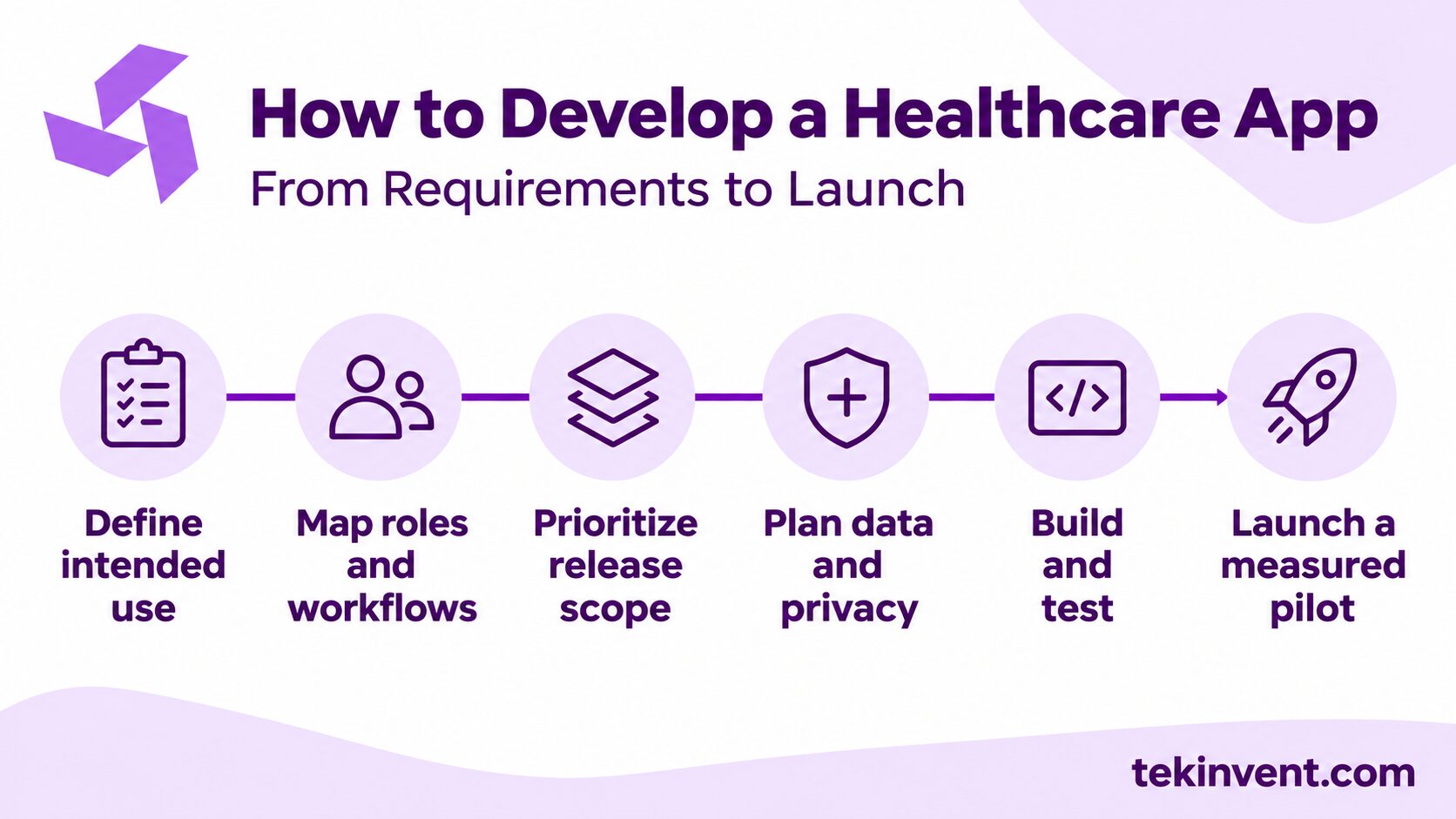
Developing a healthcare app starts with the care or operating problem it should solve. A patient portal, telehealth product, medication reminder, and clinician workflow tool have different users, risks, and system needs. Define the intended use first, then map the workflow, data, integrations, and support model before committing to a feature list.
That sequence helps a healthcare organization avoid building an attractive interface that does not fit how care is delivered. It also surfaces privacy, clinical review, and operational responsibilities while they can still shape the design.
1. Define the problem and intended use
Write a short problem statement that names the user, the situation, and the difficulty. “Patients need a better app” is not specific enough. “Patients completing intake on paper often arrive with missing medication details, which staff must collect again” gives a team something to investigate.
Talk with patients, clinicians, and staff who handle the process. Ask them to describe what happens today, where information is lost, what workarounds they use, and which exceptions cause delays. Observe the workflow where possible. A process that appears simple on a whiteboard may involve several handoffs or a second system that the project team did not know about.
Define what the app is intended to do and what it will not do. A tool that lets patients request appointments has a different role from software that recommends a diagnosis or monitors a condition. Intended use can affect clinical review, testing, and regulatory questions. Consult qualified legal and clinical professionals when the product’s role is unclear; a development estimate cannot resolve those questions.
Choose a practical outcome to measure. This may be fewer incomplete forms, fewer repeated calls about appointment status, or more patients completing a specific follow-up task. Avoid claiming improvements in health outcomes until the app has been designed and evaluated to support such a claim.
2. Identify users, roles, and access needs
List the people who will interact with the product: patients, clinicians, care coordinators, front-desk staff, and administrators. For each role, describe the tasks they need to perform and the information they need to see. A patient should not have the same access as a staff member managing records, and staff permissions may differ by responsibility.
Consider accessibility, language, device access, and digital comfort. Use clear labels, readable text, helpful error messages, and a recovery path when login fails. If the patient population uses multiple languages, include translation and clinical review in the scope rather than translating only the first screen. Test with people who reflect the intended audience.
Make sure the product does not assume every user can complete every step alone. Some patients may need staff assistance, an alternate communication method, or a way to complete a task without a smartphone. Decide how the digital workflow connects with those existing service options.
3. Map the workflow before drawing screens
Document the current workflow from the user’s first action to the result. Include the steps outside the app: staff review, approvals, record updates, notifications, and follow-up. For each step, identify who owns it and which system holds the authoritative information.
Then map the proposed workflow, including exceptions. What if a user submits a form twice? What if the appointment changes? What if a message is not reviewed before a patient expects a response? What if an external system is unavailable? These cases affect safety and support needs, even if they are less common than the normal path.
Use a prototype to test the flow before building it. Ask representative patients and staff to complete realistic tasks without coaching. Watch where they hesitate, misread a label, or switch to a workaround. The purpose is to find mismatches early, not to get compliments on the screens.
4. Prioritize the first release
The first release should support one complete, useful workflow. Avoid starting with a broad list of features that each stop halfway through the user’s task. For a patient intake app, the necessary flow may include identity checks, consent, form completion, staff review, and correction handling. A form that reaches the provider but has no review queue does not solve the whole problem.
Divide requirements into launch needs, later improvements, and out-of-scope items. Include security, accessibility, operational support, and error handling as requirements, not optional enhancements. If a manual step can safely support an early pilot, document who performs it and how the team will know it is working.
Keep a decision log with important scope choices. For example, record why the first release supports one clinic workflow and postpones self-scheduling. This helps future team members understand what evidence or constraint shaped the plan.
5. Plan integrations and data movement
List the systems the app needs to connect to, such as an electronic health record (EHR), scheduling platform, billing tool, identity service, or video provider. For each integration, specify what information moves, in which direction, how often it updates, and which system remains authoritative.
Check that the organization can obtain technical access, documentation, credentials, and a test environment. Identify who approves access and who will help when a connection fails. Vendor coordination can affect a schedule even when the app team is ready to build.
Define how the product handles duplicates, conflicting updates, missing data, and delayed responses. Test the ordinary path and recovery path. A demo using clean sample records does not prove that a live connection will behave well with incomplete or inconsistent information.
Turn a Care Workflow Into an App Plan
TekInvent can help organize your requirements, integrations, and release scope before development.
6. Address privacy, security, and clinical review
Determine what information the app collects, where it travels, and which people or services can access it. Map the app, APIs, databases, analytics, notifications, logs, backups, and support tools. Collect only the data required for the intended workflow, and avoid placing sensitive details in general analytics or debugging logs.
HIPAA applies based on the organization’s role and how protected health information is handled; it is not a generic certification attached to an app. Other requirements may apply to health products outside HIPAA. Ask qualified privacy and legal professionals to determine the rules for the specific product and business relationships.
Where HIPAA applies, risk analysis and risk management should inform the safeguards and operating procedures. Discuss authentication, permissions, encryption, audit records, backups, monitoring, incident response, and vendor agreements. A cloud or messaging provider that handles protected information may require specific contractual safeguards before production data is shared.
If the app displays clinical guidance, results, or recommendations, identify who approves content and how it will be updated. Set a process for correcting errors and responding to urgent concerns. Do not imply that clinicians are monitoring app activity unless the organization has assigned people and coverage to do so.
7. Build, test, and prepare operations
Develop the product in small increments that can be reviewed by clinical and operations stakeholders. Test the underlying workflow as well as the visual interface. Functional tests should cover user roles, edge cases, integration failures, and recovery. Accessibility and security checks should happen before real patient information is used.
Prepare an internal owner for support, account access, content updates, and vendor coordination. Define how staff report a problem and how patients get help. Plan training for each role; clinicians and administrators may need different instructions from patients.
Use synthetic or appropriately de-identified data during development where possible. Keep development and production environments separate. Before launch, rehearse backup restoration and incident response, and verify that the organization can identify who has access to sensitive data.
8. Launch with a measured pilot
Start with a defined group or workflow that the organization can support. Set a review date and decide what the pilot should answer. Measure task completion, incomplete submissions, support requests, staff rework, or other outcomes tied to the original problem. Downloads and sign-ins alone do not show whether the workflow improved.
Collect feedback from patients and staff. Separate technical defects from usability problems and process issues. If a patient stops midway, find out whether the form was confusing, the request felt intrusive, or staff instructions were unclear before adding new features.
Use the findings to improve the app or decide whether to expand. A pilot can reveal that the product needs a different workflow or that a non-digital process remains necessary for some users. Treat those results as project learning, not as a reason to expand scope automatically.
What to include in the development brief
Before requesting proposals, prepare a brief with the intended user, problem, workflow map, first-release requirements, integration assumptions, privacy questions, test plan, and post-launch responsibilities. Ask each development team to identify assumptions and exclusions. Compare proposals based on the same workflow and deliverables, not only on headline price.
A custom software development company can help turn an approved workflow into technical requirements and a phased build plan. Providers evaluating healthcare-specific capabilities can also review healthcare app development services as they consider the product’s clinical and operational needs.
Make the launch decision operational
Before setting a release date, name the person who can approve the product for patient use and the people who will support it on launch week. Confirm that the patient help channel is staffed, clinicians know where app-submitted information appears, and administrators can disable a broken feature if necessary. Prepare a short release checklist that covers account access, integrations, content approval, monitoring, and rollback steps.
Decide how the team will review the pilot. A weekly review can combine support requests, workflow measures, and staff observations. Assign each issue an owner and a decision: fix before expansion, monitor, or accept with a documented workaround. That prevents feedback from becoming an unprioritized list.
Keep the product tied to the care need
A healthcare app is ready to move forward when the team understands the problem, the people affected, the data involved, and the workflow the first release must support. That clarity makes development easier to estimate and gives the organization a better way to judge whether the finished product is useful.
Plan for the work after launch as carefully as the initial build. Support, content, access, security, and integration ownership determine whether an app can remain useful as the organization and its needs change.

Build Smart with The Right Team.
We bring expertise, technology, and trust you look for in your digital journey.