
If you are a startup, or even a large-scale enterprise, you must be curious to know, “how to build a CRM software?
You can not manage everything manually, instead you would definitely require a CRM, customer relationship management software to maintain the track of all activities, and come up with a desirable pathway.
Basically, a CRM allows businesses to keep a track of the number of visitors, and sales data for better decision making.. It helps you to optimize the performance and come up with decisions that are amazing for the businesses to automate the processes.
TekInvent, leading crm development company takes pride in offering cutting-edge development techniques that turns the entire process of the customers amazing, building software that is ideal for managing the client data and helps in building data-driven strategies.
In this blog, we are going to discuss the significance of crm software, how to build it, and different types of crm available for the businesses to automate their processes.
Are you excited to explore it with us? Let’s get started then…
Top CRM Statistics Beneficial For Businesses To Know
According to salesmate, Businesses using CRM see a 29% average increase in sales revenue. 97% of sales teams using CRM meet or exceed sales goals, with users 86% more likely to exceed them. Sales reps using CRM can shorten sales cycles by 8-14%. And CRM improves sales forecast accuracy by 32%
Sales productivity increases by 34%, and overall performance sees significant gains. 74% of users say CRM improves customer data access, boosting productivity by up to 50% with mobile access. Boosts cross-selling and upselling revenue by 39%.
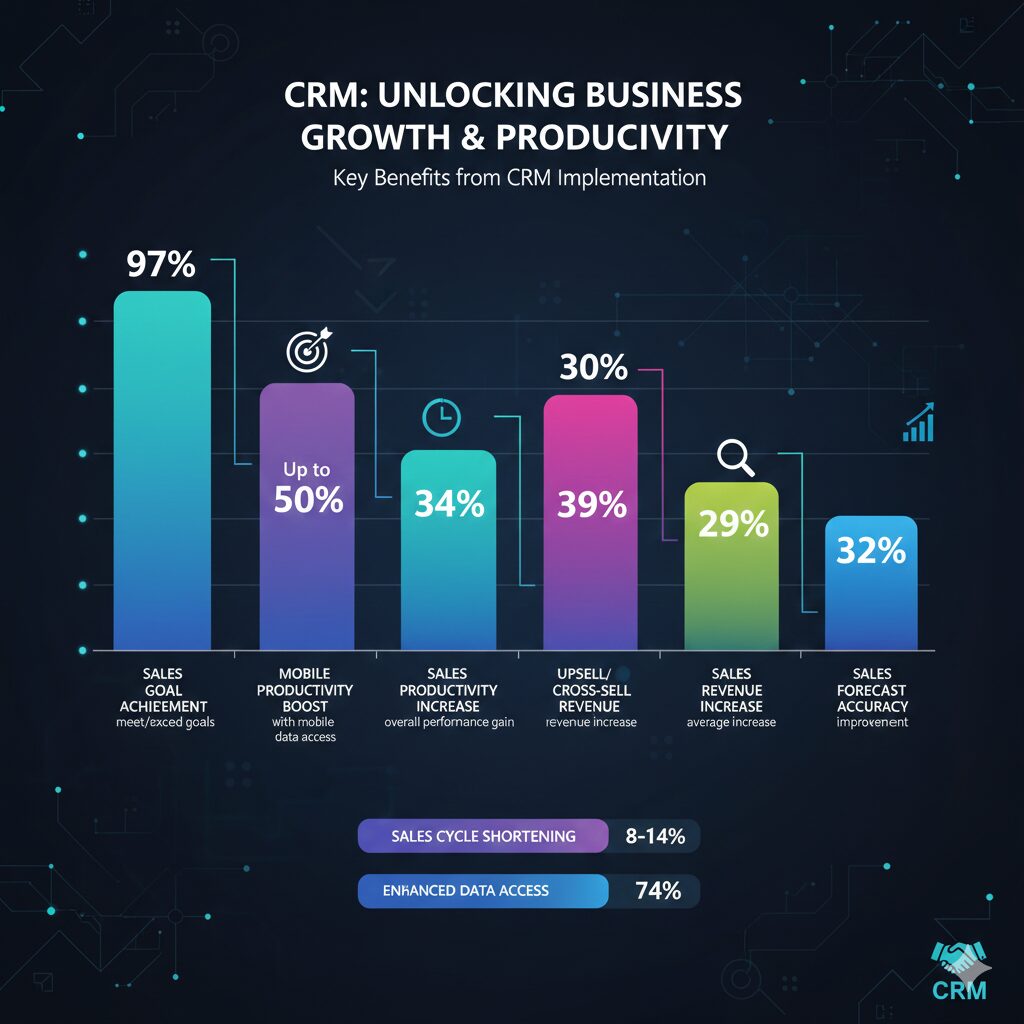
These were some of the interesting statistics that we managed to cater from different platforms. All credits to them.
Now let’s start with the blog:
What is a CRM?
A customer relationship management software is a multifunctional tool that helps businesses with management of its multiple operations in a single go. It helps the businesses to analyse the critical data, client’s interaction, and measurement of data throughout the customer lifecycle to draw data-driven decisions.
It is a software that collects data from the databases to analyse the information for knowing more about your customers and their preferences. Perhaps, it’s an all-in-one platform that helps in building your relationship with the clients better and come up with processes that are efficient. If you do all of this manually, then there will be chances of manual errors and this won’t result in a fruitful manner. However, with a well designed and developed crm solution, it’s easier for you to well optimize the information and come up with better decision making.
Therefore, whether you are a startup who is planning to scale up and learn about the clients, or a large-scale enterprise with tons of data about the clients and looking for ways to analyse it and make data-driven strategies – a CRM software is all you need!
This was the literal meaning of crm software solution and now we are going to pen down the different crm software roles to make the businesses more informed about the functionalities.
CRM Software Roles and Functionalities Breakdown
In this section, we are going to learn about the crm software solution roles and we assume that you will enjoy reading it out with us:
-
Sales Department –
The sales team can use crm software to track the prospects from the initial contact to the finalised handshake. Whereas, viewing the deals at different stages like, prospecting, negotiation and closing the deals for prioritizing the efforts. Whereas, setting the reminders for calls and emails so no leads go cold.
-
Marketing Department –
The marketing team can use CRM data to move from the guesswork to toward hyper-personalised campaigns. It allows grouping customers based on the behavior, demographics, and purchase history for targeted email marketing. Whereas, linking the specific sales back to the marketing campaign that generates the lead. Whereas, identification of the leads that are “Sales ready” based on the engagement levels. Lastly, using stored data to address the customers by names, and suggest the products which they actually want.
-
Customer Service Department –
If we talk about the customer service department then it allows access to the customer’s entire history like past purchases, previous complaints and before even the customer says hello. Moreover, it allows us to manage and track the support request to ensure timely resolutions. Whereas, offering agents with quick access to the solutions based on common customer data. Lastly, monitoring the customer feedback for identification and helping the unhappy clients with queries resolution.
-
CRM Administrator –
Managing the permission to ensure that the sensitive data is only seen by the desired people. Cleaning up the duplicate records and ensuring the data entry standards are met. Movie, custom fields, workflows and dashboards that are tailored to the company’s unique processes. And connecting the CRM with other tools like, Slack, Outlook and ERP systems for creating seamless tech stacks.
Now we are going to talk about the different types of crm softwares:
Types of CRM Softwares
A CRM also known as customer relationship management software is really important for businesses to manage the tasks and come up with better and well aligned practices. Here is a quick overview of the crm software solution types:
-
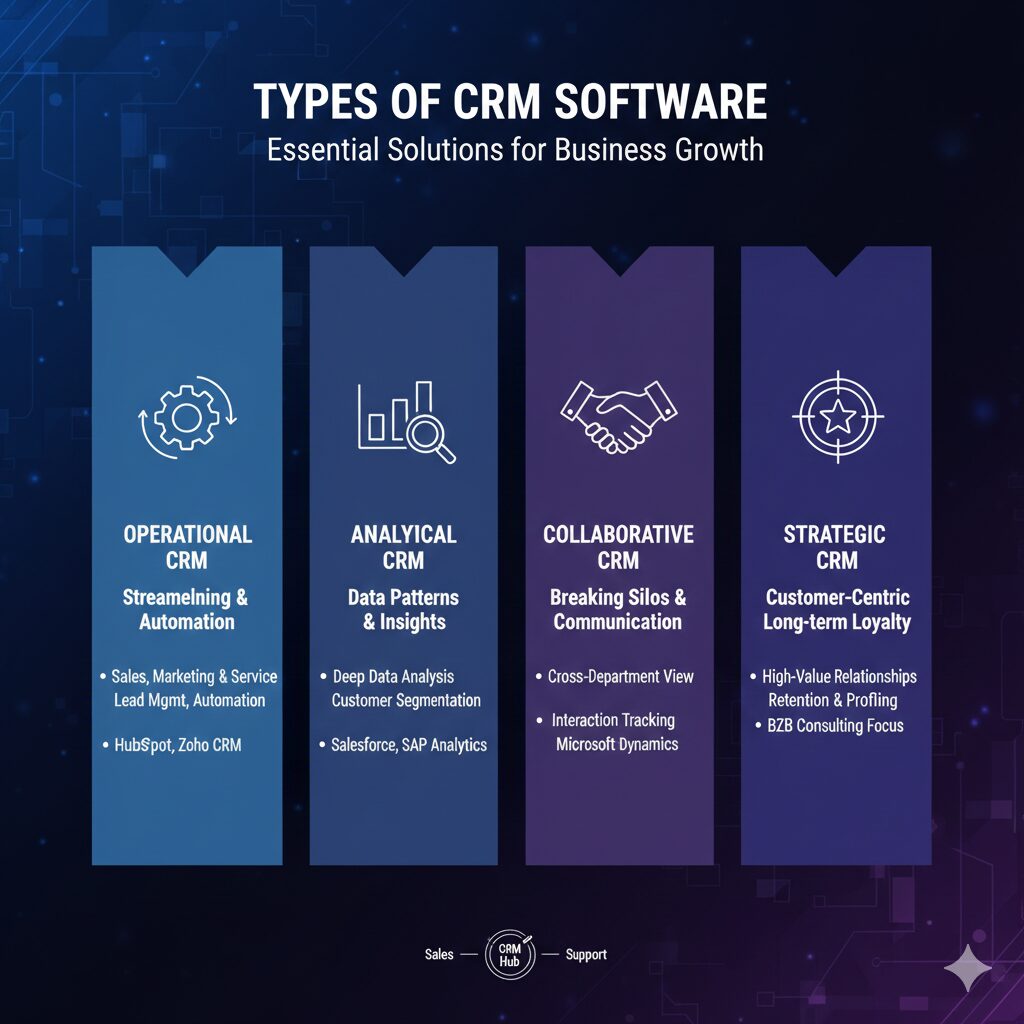
Operational CRM
Operational CRM helps in streamlining and automating the daily business processes and it’s the most common type of CRM. It acts as a frontline for your sales, marketing and service teams by handling critical data. It’s before for companies that need to manage high volume of leads and automate repetitive tasks. Whereas, the sales force automation, led tracking, email marketing triggers, and customer support ticketings come alongside. The common examples of such include, HubSpot, Pipedrive, and Zoho CRM.
-
Analytical CRM
The second type of analyzing critical customer data to uncover the patterns and insights seamlessly. It focuses on analytical information perhaps, helping you with the understanding of the reasons behind the customer action.
It’s best for mid-to-large size enterprises with massive amounts of data who need deep insights into the customer lifecycle and retention. Customer segmentation, data mining, predictive modeling (churn risk), and ROI tracking.
The common examples of analytical CRM includes: Salesforce (Analytics Cloud), SAP Analytics, Microsoft Power BI integrations.
-
Collaborative CRM
Collaborative CRM breaks down the silo structure within the organisations and comes up with a strategic pathway. It operates following a primary goal to ensure sales, marketing and support teams that are looking for a single version of the entire organisation.
It’s best for businesses that are having multiple departments or locations where the communication gap is mandatory and they are looking for ways to solve this issue.
It comes with interaction management like tracking every touchpoint with channel management and determination of the preferred contact methods and sharing documents folders through a single hub.
-
Strategic CRM
Lastly, we are going to talk about strategic CRM that puts the customers at the center of the long-term businesses. It often groups with the collaborative CRM that is a dedicated Strategic CRm compiled well with the high-value, long-term loyalty programs with quick transactions.
It enables the companies to rely well on repetitive business operations and services like luxury brands, B2B consulting firms.
Holistic Comparison between CRM Operations
| Type | Primary Goal | Key User | Value Proposition |
| Operational | Automation | Sales/Marketing Reps | Saves time & boosts efficiency |
| Analytical | Insights | Data Analysts / Execs | Drives smarter decisions |
| Collaborative | Communication | Cross-functional Teams | Seamless customer experience |
| Strategic | Long-term Value | Business Strategists | Higher retention & loyalty |
How to build a CRM Software Solution?
As we have already discussed about the CRM types, and operations, now is the right time to learn about the ways through which you may build amazing CRM software solutions to prioritize your business core operations.
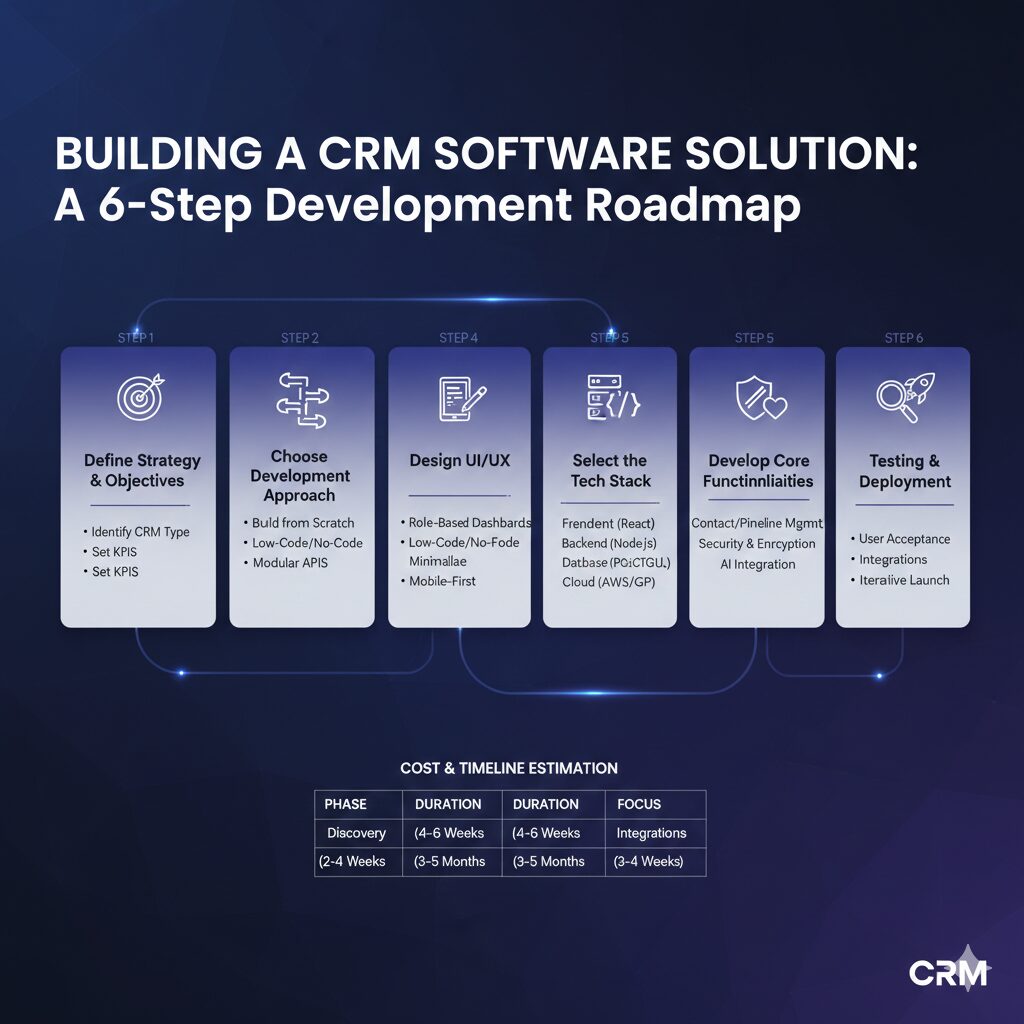
Step 1# Defining Your Business Strategy:
Before you hire an app developer to work on the development of your CRM software you should know:
- Why do you need a CRM? Do you need an Operational, Analytical, or Collaborative CRM for your business.
- Why should the CRM improve? What things should be added up like, reducing the lead response time by 20% or increasing the upselling by 15%.
Step#2 Choose the Development Approach:
You have to answer three main questions like,
- Would you be building the solution from scratch? Complete control, unique architecture and higher cost but longer time to market it?
- Fast and cost-effective for simple CRMs but comes with limited scalability concerns.
- Using APIs and pre-built components like, Twilio for communications or Strip for online payments to speed up the development process.
Step#3 Designing the UI/UX for the Software Solution:
A CRM is only valuable if your team actually uses a role based dashboard that ensures sales representative seeds the lead chart only and the support teams then later manage it.
- Focusing on the three-click navigation without any data point being missed instead being accessible within three clicks.
- Since 2026 sales teams are increasingly mobile, ensuring the app works perfectly on tablets and smartphones.
Step#4 Selecting the Tech Stack:
Perhaps, for a seamless and robust crm software solution we recommend:
- Frontend: React.js or Vue.js for a responsive, fast-loading interface.
- Backend: Node.js, Python (Django), or Go for handling complex logic and high concurrency.
- Database: PostgreSQL (for structured customer data) or MongoDB (for flexible, unstructured data like interaction logs).
- Infrastructure: AWS or Google Cloud for secure, scalable hosting.
Step#5 Developing the Core Functionalities of the CRM:
As a leading business firm you should focus on building an MVP with core operations like;
- Contact management that serves as a central hub for all the customer details.
- Pipeline management that serves as a visual board for tracking the deal progresses and plan out further strategies.
- Security and encryption board that is essential for GDPR and CCPA compliance. Use OAuth 2.0 for secure logins.
- AI Integration as a CRM isn’t complete without AI for lead scoring and automated meeting summaries.
Step#6 Testing and Deployment of the CRM Solution:
Lastly, you should test all the features within the CRM software to:
- User Acceptance Testing (UAT): Let your actual sales and marketing teams test the beta version.
- Integrations: Test the “plumbing” between the CRM and your email, calendar, and accounting software.
- Iterative Launch: Deploy to one department first, gather feedback, and then roll it out company-wide.
Essential Features To Be Integrated Within CRM Software
In this section, we are going to discuss the essential features that should be present within a crm software solution:
-
Contact Management –
Just like a heart is necessary for a human body to function, similarly, contact management is the heart of the CRM software.
It goes beyond the simple address book as it stores the 360 degree view of every customer and includes contact details, communication history, social media profiles and personal preferences to ensure that anyone in the company can pick up the conversation wherever it was left out!
-
Tasks Management –
The core function of the CRM software is to allow seamless task management. You may stay on the top of your daily “to-do” taken by the amazing feature of CRM that comes with instant task management. It allows the users to create, assign, and track the progress of specific actions related to a client. Whether it’s following up on a quote or sending a contract, you can track the status from “Pending” to “Completed.”
-
Reminders Setting –
Automated reminders within the CRM software make sure that no lead is going unanswered, and no meeting is missed. You may set up alerts for instant follow-ups, contract renewals, and even customer birthdays that helps you to maintain proactive rather than reactive throughout the relationship.
-
Calendar Editing –
Integrated calendars within the CRM are best for seamless scheduling of the meetings. Users can book the meetings, view the teammates available time for meetings, and even sync with external tools like Google Outlook or Calendar through it.
-
Basic Reporting –
One of the crucial things is data that is useful for understanding the overall behaviour of the clients. A basic report will offer you a snapshot of the performance like,number of new leads acquired within the month, total sales volume, and individual team member activity. These visual charts help managers make informed, data-driven decisions.
-
File Sharing –
You can easily share the files through the CRM instead of emailing through your corporate email address. A centralized file-sharing system that allows you to attach the contracts, invoices, and project briefs that directly connects you with the customers.
-
Email Marketing –
You can turn your CRM into a communication powerhouse through the well integrated email marketing APIs. It comes with automated “drip” campaigns scheduling that is based on the customer behavior.
-
Pipeline Overview –
The pipeline overview is a visual representation of your entire sales process. Typically shown as a Kanban board, it allows you to see how many deals are in the “Discovery,” “Negotiation,” or “Closing” stages. This bird’s-eye view helps you identify bottlenecks and forecast future revenue with confidence.
CRM Software Creation Cost –
There are certain costing curves that should be kept in mind before starting with the development of a crm solution. Here is a quick overview for you:
-
CRM Cost by Complexity Levels:
Here is the breakdown of the cost based on the type of the CRM modules:
| Complexity | Development Time | Best For | Estimated Cost (2026) | |
| Basic / MVP | 2–4 Months | Startups / Small Teams | $15,000 – $40,000 | |
| Mid-Tier | 4–8 Months | Growing SMBs | $40,000 – $100,000 | |
| Enterprise | 8–18 Months | Large Corporations | $100,000 – $300,000+ |
-
Feature-Specific Pricing
Perhaps, if you are planning to build a CRM with a modular one, that here is the estimated cost breakdown for you:
| Feature | Estimated Cost |
| Core Contact Management | $3,000 – $7,000 |
| Sales Pipeline & Kanban Boards | $5,000 – $12,000 |
| AI Lead Scoring / Predictive Analytics | $15,000 – $45,000 |
| Third-Party API Integrations (per app) | $2,000 – $8,000 |
| Advanced Reporting & Dashboards | $7,000 – $15,000 |
| Mobile App Extension (iOS & Android) | $30,000 – $60,000 |
-
Regional Developer Rates (Per Hour)
Hiring costs vary significantly depending on where your development team is located:
- North America: $120 – $220/hr
- Western Europe: $80 – $150/hr
- Eastern Europe: $40 – $80/hr
- South/Southeast Asia: $20 – $50/hr
-
Post-Launch & Hidden Costs
Building the software is just the first step. You should budget for these ongoing annual expenses:
- Maintenance: 15–20% of the initial development cost per year.
- Cloud Hosting (AWS/Azure): $1,000 – $6,000 per year (scales with users).
- AI API Usage: $50 – $200 per month (depending on token consumption).
Key Takeaway
And we are done for the day. You may hire TekInvent for the creation of your ideal CRM solution all custom-made to meet the unique needs of the businesses.
Contact our teams of seasoned software developers to share the ideas and working plans with you. You may collaborate with them and learn how you can make your app idea a million-dollar generating software solution in minutes!

Build Smart with The Right Team.
We bring expertise, technology, and trust you look for in your digital journey.