
Chatbots are everywhere these days, and for a good reason. By 2027, Gartner predicts that chatbots will be the main customer service channel for about 25 percent of companies. Businesses are using them to give fast support, make complex information easier to understand, and keep websites more engaging. The AI chatbot market is growing fast too, expected to jump from US$5.4 billion in 2023 to US$15.5 billion by 2028.
If you want a chatbot for your business, you can either build one yourself or use an online tool. Thanks to AI, creating a smart, useful chatbot is easier than ever. In this article, we will show how companies use chatbots, the tools you can use to make one, and simple tips to get started even if you are new to AI.
In this blog, you will learn everything about a chatbot, how to create a custom one or one from a tool. Let’s get started.
What is A Chatbot?

A chatbot is a software program that can have a conversation with people using text or voice. It uses artificial intelligence (AI) to understand questions and provide helpful responses. Modern chatbots use technologies like Natural Language Processing, Natural Language Understanding, and Machine Learning to understand what people are saying and get smarter over time.
Chatbots make life easier for businesses by handling routine tasks, especially in customer support. They can answer common questions, guide customers to find what they need, and pass more complex issues to a human agent. By automating these interactions, chatbots help companies provide fast and consistent support without needing a person to be available all the time.
How to Create A Chatbot – 6 Easy Steps
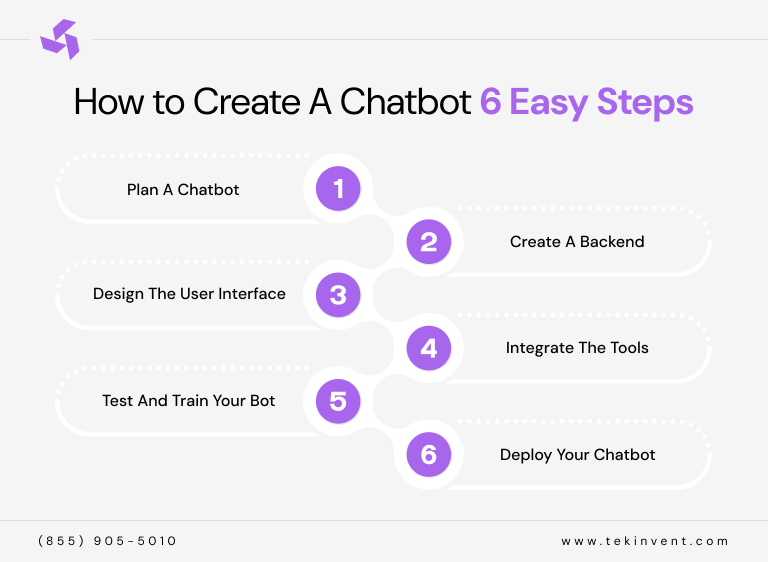
Creating a chatbot for your business may seem complicated, but breaking it into simple steps makes it much easier. Here’s a step-by-step guide to help you plan, build, and launch your own chatbot successfully.
1. Plan A Chatbot
Before you start building, decide what you want your chatbot to do and where users will interact with it. Think about the tasks it should handle, like answering customer questions, guiding users, or collecting feedback. If you’re building an AI chatbot, remember it relies on technologies like natural language processing and machine learning. You can either build these from scratch or use ready-made platforms that already include AI capabilities.
2. Create A Backend
The backend is the engine that powers your chatbot. It controls how the bot processes requests, responds to users, and connects to other systems. Creating a solid backend ensures your chatbot works smoothly and can handle the tasks you planned. Make sure to hire the best team for the software development.
3. Design the User Interface
The user interface (UI) is what your users will see and interact with. This includes chat windows, buttons, menus, and overall design. A clean, intuitive UI makes the chatbot easy and enjoyable to use. If you’re using a white-label solution, your design options may be limited, but building from scratch gives you full control over branding and functionality.
4. Integrate the Tools
Your chatbot may need to connect with other tools like analytics, customer databases, or CRM systems. Integration ensures it has the information it needs to give accurate responses and helps you track performance.
5. Test and Train Your Bot
Testing is critical. Train your chatbot with data from your website, FAQs, or company documents so it can answer questions correctly. Check for bugs, test different user scenarios, and refine its responses. If you’re using a rule-based bot instead of AI, test your decision trees to make sure it communicates naturally.
6. Deploy Your Chatbot
Finally, it’s time to launch your chatbot. Even after deployment, continue collecting feedback and monitoring performance. Over time, you can update and improve it to ensure it continues helping your users effectively.
What Are Chatbots Used For?
Chatbots are versatile tools that businesses use for customer service, content support, and lead generation. Here’s a closer look at the main ways chatbots help companies:
1. Customer Service
Chatbots can provide instant support to customers anytime, day or night. They handle simple questions and routine tasks, freeing up human agents to focus on more complex issues. Plus, AI chatbots can offer support in multiple languages without hiring additional staff, making global customer service easier.
2. Virtual Help Desks
Chatbots can be trained to understand your website, documents, databases, or company policies. Once trained, they can act as a virtual help desk for customers, answering questions about products, services, or policies. They can also serve employees, guiding them through HR policies, internal documents, or training materials.
3. Collect Leads
Chatbots can collect information from potential customers, qualify leads, and pass them to your sales or marketing team. This helps your team work more efficiently and allows your business to handle more inquiries as it grows, without needing extra staff.
How Do Chatbots Work?
AI chatbots use artificial intelligence to make customer interactions faster, smarter, and more efficient. By combining machine learning (ML) and natural language processing (NLP), these chatbots can understand user questions and respond in a human-like way. Here’s a simple breakdown of how AI chatbots work:
1. Tokenization
The chatbot breaks down a user’s message into smaller parts, called tokens, like words or phrases. This helps it understand the meaning behind the text.
2. Intent Classification
Next, the chatbot identifies the user’s intention. Are they asking for help, looking for information, or making a complaint? Knowing the intent lets the chatbot respond correctly.
3. Entity Recognition
The chatbot then picks out important details, like names, dates, or locations, to make its responses more accurate and personalized.
4. Knowledge Base Analysis
It searches its internal knowledge base or database to find the right answer, using semantic analysis to ensure the response is relevant.
5. Response Generation
Once it has the information, the chatbot crafts a response. Advanced AI can make answers sound natural and human-like.
6. Continuous Learning
Every interaction helps the chatbot improve. Over time, it becomes better at handling complex questions and giving accurate answers.
Note: AI chatbots are now essential for automating customer interactions with instant responses. As businesses grow, there’s also a rising demand for AI systems that don’t just respond but can take actions. If you’re such an owner then that’s where AI agents come in.
When Does Your Business Need A Chatbot?
Your business might need a chatbot when you want to provide faster customer support, handle repetitive questions, or improve engagement on your website or app. Chatbots are useful for businesses that receive high volumes of inquiries, want to collect leads efficiently, or need 24/7 assistance without hiring extra staff. They also help streamline internal processes, like employee support or training, making operations smoother and more scalable as your business grows.
Components of AI Chatbots
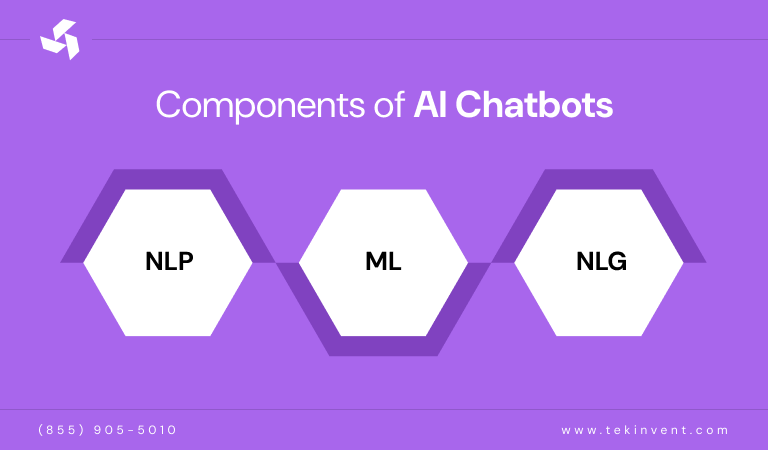
AI chatbots are designed to simulate human-like conversations by understanding the context and intent of the user using artificial intelligence. The main components that make an AI chatbot work effectively include:
1. NLP
NLP is the foundation of any AI chatbot. It helps the chatbot understand the meaning behind what users say, not just the words themselves. NLP uses advanced algorithms to analyze text or speech, break down complex sentences into simpler phrases, identify parts of speech, and link synonyms. This allows the chatbot to accurately interpret customer questions and respond in a way that is relevant to the conversation.
2. ML
Machine learning allows chatbots to improve over time. By learning from past interactions, chatbots become smarter and more effective at engaging users. The more data they process, the better they get at providing helpful information and responding in a human-like way. Machine learning is key to making AI chatbots adaptive and capable of handling increasingly complex queries.
3. NLG
Natural language generation enables chatbots to create responses in human language. While NLP and NLU help the chatbot understand the user, NLG allows it to produce answers that are clear, natural, and easy to understand. This involves content planning and sentence structuring to ensure the responses are grammatically correct, contextually accurate, and sound natural to the user.
Note: Together, NLP, ML, and NLG form the backbone of AI chatbots. These components allow chatbots to function as practical tools for customer service, lead generation, employee support, and many other business applications, making interactions faster, smarter, and more scalable.
Popular Online Tools to Create Your Own Chatbot
Below, we have reviewed a variety of options to bring you a diverse selection of chatbot platforms that stand out for their features and performance. Each platform offers unique strengths, from easy no-code solutions to fully customizable enterprise-level options, making it easier for businesses of all sizes to find the right fit for their needs and technical capabilities. Here are ten powerful chatbot platforms you should consider:
1. Botpress – Builder for Building Powerful Bots
Botpress is one of the most powerful AI chatbot builders available. It lets you create AI agents with LLM-powered language processing, advanced logic and workflows, knowledge bases, databases, web browsing, and integrations with other apps. Essentially, you can build chatbots that handle almost any task.
This power comes with complexity. It took some time to understand everything Botpress can do, and building a chatbot that uses even a small part of its capabilities can take patience.
If you want to build highly customizable chatbots, Botpress is ideal. It can serve as an intelligent reservation manager for a restaurant, a 24/7 sales assistant for a small business, and much more. It integrates with platforms like WhatsApp, Messenger, and Stripe, and it is free to get started.
However, if your goal is simply to add a chatbot to existing tools or workflows, Botpress may be more than you need. Other platforms are easier for quick setups.
Pros of Botpress
- Extremely powerful and flexible
- Free to get started
Cons of Botpress
- High complexity due to advanced features
Botpress Pricing
Free for one bot, 500 incoming messages, 100 MB of vector database storage, and US$5 of AI usage per month. Beyond that, pricing is pay-as-you-go and can get complicated.
2. Zapier Chatbots – Builder for AI Orchestration
Zapier Chatbots can connect with over 8,000 apps, making it easy to integrate chatbot functionality into the tools you already use. Need to collect leads? They can be sent directly to your CRM. Want customer feedback? It can be logged to Google Sheets, Slack, or any app you prefer.
Zapier Chatbots run on GPT-4.1 mini or GPT-4o mini depending on your plan. You can also add your own OpenAI or Anthropic API key to use GPT-5, Claude, or other AI models. The platform allows you to connect up to 20 knowledge sources and even scrape information from your website or help documents. You can also customize the chatbot’s appearance, behavior, and conversation logic to capture information for follow-ups.
Once your chatbot is ready, you can embed it on your website or as a pop-up. This makes it simple to create lead generation or customer support bots in minutes and connect them with your existing tech stack. Zapier also provides chatbot templates to help you get started quickly.
Pros of Zapier Chatbots
- Connects chatbot data to thousands of apps
- Easy to set up and use
Cons of Zapier Chatbots
- Limited if you are not using automation features
Zapier Chatbots Pricing
Free for two chatbots with basic features. The Pro plan starts at US$20 per month for up to five chatbots, ten knowledge sources, and website embedding.
3. Chatbase – Builder for Ease of Use
Chatbase is one of the easiest chatbot builders I have tried. I was able to train a chatbot, now called an AI agent, to answer questions about me and my work and deploy it on my website in less than 20 minutes. While it may not offer the highest level of complexity or customization, it still provides plenty of useful features for businesses.
Chatbase can use uploaded files, text, website links, Notion pages, and FAQs as sources of knowledge. You can choose between GPT, Claude, and Gemini models depending on your plan. It is simple to embed on your website and can also integrate with WhatsApp, Messenger, and Instagram to interact with customers. For internal use, you can connect it with Slack.
For simple business bots, Chatbase is highly effective. Provide information about your products, policies, or services, and it can handle most common customer support queries. You can also create AI actions for your agents, allowing them to make bookings, pull real-time information, create tickets, and perform many other tasks across your services.
Pros of Chatbase
- Very easy to use
- Affordable to start
Cons of Chatbase
- Limited customization compared to advanced options
Chatbase Pricing
Free plan with limited features. The Hobby plan starts at US$40 per month for one AI agent, five AI actions, third-party integrations, and 2,000 messages per month.
4. Botsonic – Builder for Online Businesses
Botsonic falls between Chatbase and Botpress when it comes to ease of use and power. It is slightly more complex than Chatbase, but it offers more capabilities, making it a great choice for online businesses.
Like other chatbot builders, Botsonic lets you choose AI models, embed a chatbot on your website, and connect through channels like WhatsApp and Messenger. It can use your website, uploaded documents, and other sources as knowledge to respond to customers effectively. Its bots, now often called agents, can also interact with other tools and platforms.
Botsonic features Workflows, which require creating a trigger and an action. The trigger detects the user’s intent, such as booking a flight or checking an order status. The action connects the bot to any API, allowing it to perform tasks automatically, like gathering inputs from the user and completing the requested action. For online businesses, this makes it possible to automate a variety of customer interactions and tasks efficiently.
Pros of Botsonic
- Easy to use
- Powerful and flexible
Cons of Botsonic
- Expensive compared to other options
Botsonic Pricing
Plans start at US$49 per month and go up to US$299 per month. The most advanced features are only available on the highest-priced plan.
5. Chatbot – Builder for A Quick Bot
ChatBot, from support platform Text App, is one of the fastest and easiest ways to build a chatbot. Unlike many other services, it still calls its bots chatbots rather than agents, which may be due to trademark or branding reasons.
The automatic bot builder can take your website and use AI to create a full logic flow, rather than just storing information in a database. This allows you to see how the chatbot will respond to different user requests and make edits if needed. I tested it with a small online store, and it was instantly able to recommend products and provide helpful advice. ChatBot works especially well for businesses that already have information ready and just want to turn it into a functional chatbot.
In terms of AI models, ChatBot has fewer options. You can choose its custom AI Assist model or GPT-4.1. If you prefer models like Claude or Gemini, these are not currently available.
Pros of ChatBot
- Quickly creates powerful chatbots
- Easy to customize
Cons of ChatBot
- Limited model choices
- Expensive
ChatBot Pricing
The Starter plan begins at US$65 per month for one active chatbot and 1,000 chats. The Team plan starts at US$169 per month and includes collaboration features, five active chatbots, and 5,000 chats per month.
How to Pick the Best Chatbot Builder?
When choosing the right chatbot builder for your business, start by assessing your technical skills. Decide whether you want a no-code platform or a code-based solution. Next, define your goals, such as improving customer support, generating leads, or boosting sales.
Prioritize features that matter most to your business, including integrations with CRM systems and other apps, natural language processing quality, customization options for personality and conversation flows, analytics, deployment channels like websites or WhatsApp, AI capabilities including large language models such as GPT, and pricing, including free tiers or predictable costs.
Before committing, test free trials to make sure the platform offers deep integrations and can perform well under heavy usage. Focus on tools that align with your budget and can scale as your business grows.
Final Thoughts
Building a custom chatbot for your business is no longer a complex task thanks to AI and the wide range of tools available. Whether you want to improve customer support, generate leads, or automate repetitive tasks, chatbots can save time, increase efficiency, and enhance user experience.
Start by defining your goals, choosing the right platform for your technical skills and budget, and testing your bot thoroughly. With the right setup, a chatbot can become a powerful, scalable tool that grows with your business.

Build Smart with The Right Team.
We bring expertise, technology, and trust you look for in your digital journey.